

Shareable fun video content is short, identity-rich video designed to make a viewer immediately want to send it to someone else. That is the whole definition. Everything else is execution.
Before you shoot a single frame, run this micro-check:
- Hook: Does the first two seconds show the outcome, the shock, or the laugh — not a logo or a slow intro?
- Identity or utility: Will a viewer think “this is so me” or “my friend needs to see this”?
- Payoff: Does the clip end on something satisfying, surprising, or loopable?
Hit all three and you have a clip worth sharing. Miss any one and you have content that gets watched but not forwarded. The difference matters because shares carry algorithmic weight that likes simply do not.
Key takeaways
Shareable fun video content is engineered, not accidental: the hook, identity signal, and payoff are the three structural choices that determine whether a clip travels or stalls.
| Point | Details |
|---|---|
| Hook in seconds 0–3 | Show the outcome or the shock first; never open with an intro or a logo. |
| Share rate benchmark | TikTok’s platform average is around 0.41%; top formats clear 1–2%. |
| Captions are non-negotiable | Animated, word-for-word captions lift watch time and shares in mute autoplay feeds. |
| Consent and rights | Document consent for every person and image, especially for AI-generated or adult content. |
| Squish for fast AI clips | Upload a photo, animate it in under 60 seconds, and publish a loop-ready shareable clip. |
Table of Contents
- Why shareability matters more than views
- What actually makes video content shareable and fun?
- Shareable formats and fun video ideas you can shoot today
- How to create a shareable fun video: step-by-step checklist
- Platform-specific tips for TikTok, Reels and YouTube Shorts
- How to measure shareability and run fast experiments
- Ethics, rights and consent when creating or remixing content
- Tips for encouraging your audience to actually share
- Why short, playful AI-driven videos are worth your time
- Squish makes shareable AI videos fast, with no editing skills needed
- Sources
Why shareability matters more than views
Reach, trust, and cost-efficiency are the three outcomes that make shareability worth engineering rather than hoping for. A view is passive. A share is an endorsement. When someone forwards your clip to a friend, they are lending their social credibility to your content, which is digital word-of-mouth at zero additional cost to you.
The metrics that actually tell you whether a video is shareable are not the ones most dashboards surface first:
- Share rate: shares divided by views. TikTok’s platform average sits around 0.41%; top-performing formats regularly clear 1–2%.
- Watch-through / completion rate: the percentage of viewers who reach the final frame. Low completion kills distribution before shares even have a chance.
- Saves: a strong proxy for utility and rewatch intent, weighted heavily by Instagram’s algorithm.
- Replays: signals a loop edit worked or the payoff was worth a second look.
Understand why AI video boosts engagement for photo creators and you will see the same pattern: the clips that get replayed and saved are the ones that feel personal and surprising at the same time.
What actually makes video content shareable and fun?
Virality is not luck — it is a repeatable sequence of structural choices. Here are the seven elements that consistently drive sharing, each with a quick example of what it looks like in a real clip.
- Hook in seconds 0–3. Show the most compelling moment first. A cooking clip that opens on the finished dish, not the chopping board, holds twice as many viewers past the five-second mark.
- Identity signalling / social currency. Design for the “this is so me” reaction. A clip captioned “every freelancer at 11pm” works because viewers tag themselves by sharing it. Identity signalling is one of the highest-leverage creative choices to trigger forwarding.
- Emotional arousal. Surprise, delight, mild shock, or genuine laughter all spike the neurological urge to share. Flat, informational clips rarely travel.
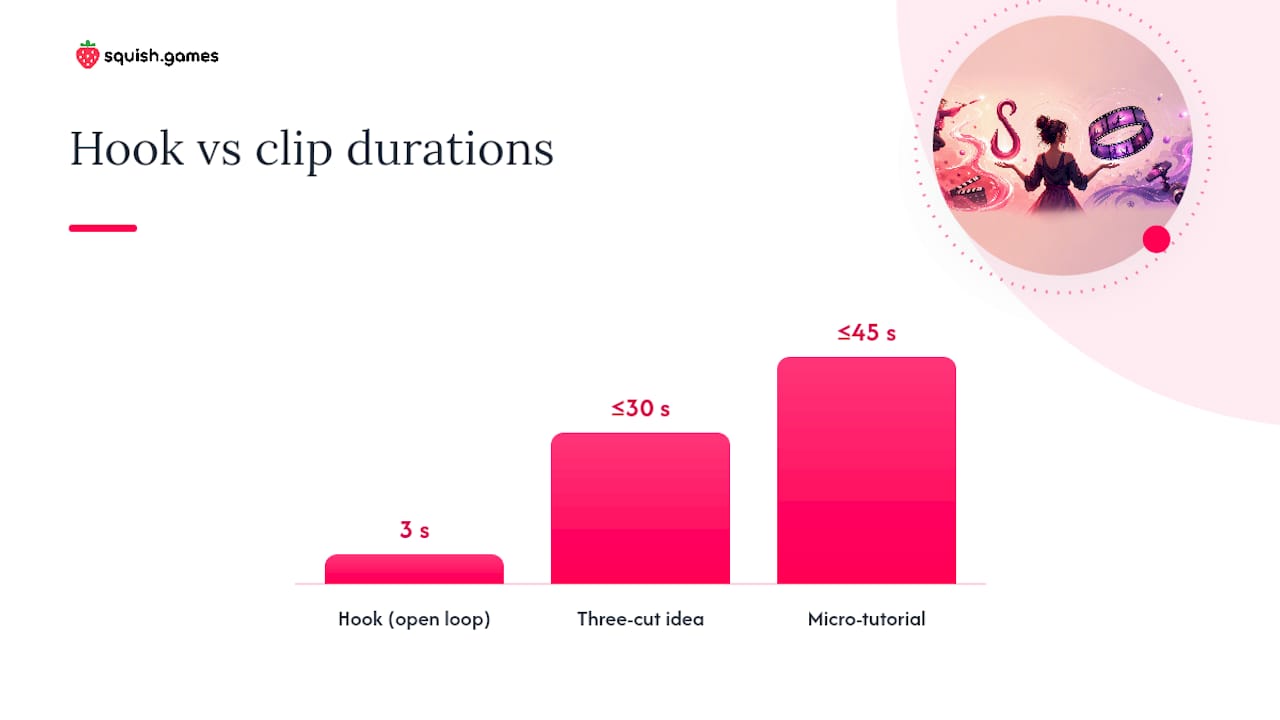
- Brevity. Under 30 seconds for comedy and reaction content; under 60 seconds for tutorials. Every extra second is a drop-off risk.
- Pattern interrupt. A sudden cut, a sound effect, a text overlay that contradicts the visual — anything that snaps a scrolling thumb into attention. Place one in the first three seconds and again at the midpoint.
- Captions. Captioned shorts see materially higher watch time and share performance, particularly in mute autoplay environments. Animated, word-for-word captions outperform static subtitles.
- Clear payoff or loop. The final frame should either resolve the open loop from the hook or cut back to the beginning so the clip plays again naturally.
Pro Tip: Start with the outcome, not the intro. The single most common mistake creators make is spending the first five seconds explaining what the video is about. Show the result first, then explain how you got there.
Shareable formats and fun video ideas you can shoot today
Some formats reliably outperform others because they are structurally built for forwarding. Before/after reveals, POV skits, tag-a-friend prompts and user challenges consistently produce higher share rates than straight talking-head content.
High-share formats to template:
- POV skit (you are the character in a relatable situation)
- Before/after reveal (transformation, makeover, result)
- Micro-tutorial (one tip, one outcome, under 45 seconds)
- Relatable comedy (the “this always happens to me” format)
- Duet or response (react to a trending clip in your niche)
- UGC spotlight (feature a follower’s photo or comment)
- Tag-a-friend prompt (“send this to the person who…”)
30–60 second idea prompts you can copy and adapt:
- Open on your phone screen showing a notification you did not expect. Pause. React. Payoff: reveal what it says.
- Show a before photo of your workspace. Cut to after. Add a single text overlay: “it took 11 minutes.”
- Record yourself doing one thing wrong, then immediately doing it right. No narration needed.
- Start mid-sentence: “…and that is why I will never do that again.” Then cut to the story.
- Film your pet or avatar reacting to a sound. Let the reaction be the whole clip.
- Use an AI-animated photo of yourself dancing to a trending audio. First three seconds: the still photo. Payoff: it starts moving.
- “Things nobody tells you about [your niche]” — one tip per cut, three cuts total, under 30 seconds.
- Show a result. Cut to the process. Cut back to the result. Loop.
- Film a “rate my [thing]” prompt and leave the verdict to the comments.
- Open with a question on screen. Answer it in exactly five words. End.
The first three seconds of each prompt above are designed to create an open loop — a question the viewer needs answered before they can scroll away. That open loop, closed by a satisfying reveal, is the structural backbone of every clip that travels.
How to create a shareable fun video: step-by-step checklist
Production quality matters far less than structural quality. A shaky clip with a great hook and a satisfying payoff will outperform a polished clip with a slow intro every time.
- Pick one idea from a proven format. Use the prompts above or a format you have seen perform well in your niche. Do not try to combine two formats in one clip.
- Write a S.T.A.R.T. script. Situation (one sentence), Tension (the problem or question), Action (what happens), Reveal (the payoff), Tag (the share prompt). Keep the whole script under 80 words.
- Test your hook before you shoot. Say the first line aloud. If it does not make someone want to know what happens next, rewrite it.
- Capture in portrait, 9:16. Shoot close. Faces and reactions hold attention better than wide shots.
- Edit for rhythm, not length. Cut on the beat. Use speed ramps to skip dead air. Keep every cut purposeful. A 22-second clip with tight cuts feels faster than a 15-second clip with one long take.
- Add animated captions. Word-for-word, synced to speech. This is not optional for mute autoplay feeds.
- Place your share prompt at peak engagement. Algorithms now weight shares and saves over likes, so a scripted “send this to someone who needs it” placed at the moment of highest emotional engagement can meaningfully lift your share rate.
- Loop the ending. Cut the final frame so it flows back into the first. Replays count as engagement.
- Choose a cover frame that shows the payoff. The thumbnail should make a viewer think “I want to know how that happened.”
- Publish at peak audience time, then engage for the first 30 minutes. Reply to every comment. Early engagement signals quality to the algorithm.
Pro Tip: For AI image-to-video content, the “hook” is often the moment the still photo starts moving. Upload a portrait or character image, let the AI animate it, and use the first frame of movement as your three-second hook.
Caption templates that drive shares:
- “Send this to [specific person type].”
- “Tag someone who does this every time.”
- “Share if this is literally you.”
- “Who else needs to hear this?”
Platform-specific tips for TikTok, Reels and YouTube Shorts
The same clip needs small but meaningful adjustments for each platform. What TikTok rewards differs from what Shorts rewards, and posting the same file without adapting it leaves distribution on the table.

| Platform | Ideal length | What the algorithm weights most | Key native tip |
|---|---|---|---|
| TikTok | 15–30 sec (comedy/reaction), up to 60 sec (tutorial) | Shares, replays, completion rate | Use trending audio from the TikTok library; stitch or duet for reach |
| Instagram Reels | 15–30 sec | Saves, shares to Stories, watch-through | Add a text hook in the first frame; use Reels-native captions |
| YouTube Shorts | 30–60 sec | Watch time, likes, subscribers gained | Hook must land in the first two seconds; end with a subscribe prompt |
Cross-posting checklist:
- Remove TikTok watermarks before uploading to Reels or Shorts (both platforms suppress watermarked content).
- Re-export with the correct aspect ratio for each platform (9:16 for all three, but safe zones differ slightly).
- Rewrite the caption natively for each platform’s tone. TikTok captions are conversational; YouTube Shorts descriptions benefit from a keyword.
- Check audio licensing. A track cleared on TikTok may not be cleared on Reels.
Short-form video viewers are a large and growing global audience, and each platform is competing for that same attention. Native-format posts get preferential distribution on every one of them.
How to measure shareability and run fast experiments
Vanity metrics feel good and tell you almost nothing. Share rate, completion, and saves are the three numbers worth watching, in that order.
- Set a baseline. Pull share rate, completion rate, and saves for your last ten clips. Calculate the average for each. This is your benchmark.
- Run a hook A/B test first. Post two versions of the same clip with different openings — same audio, same payoff, different first three seconds. Whichever version holds viewers past the five-second mark at a higher rate wins. Test the hook before anything else because early drop-off determines almost all downstream distribution.
- Read the retention curve. Every platform’s analytics shows you exactly where viewers leave. A cliff at second three means the hook failed. A cliff at the midpoint means the middle section lost momentum. A cliff at the final second means the payoff did not land.
- Test share CTAs second. Once your hook is proven, test two different share prompts (“tag a friend” versus “send this to someone who…”) across similar clips and compare share rates.
- Build a template from winners. When a clip clears your benchmark on share rate, document its structure: hook type, length, caption style, CTA placement. That structure is your repeatable template.
Keep test cycles short — three to five days per experiment is enough for short-form content to gather meaningful signal. Do not wait for a clip to “age in” before reading the data.
Ethics, rights and consent when creating or remixing content
This section matters more than most creators treat it. Copyright and consent issues can get content removed, accounts banned, or worse.
Consent checklist before you publish:
- Every person visible in the clip has given explicit, documented consent to appear.
- No minors appear in adult-themed or NSFW content under any circumstances.
- AI-generated faces or characters are clearly original or licensed — not based on a real person’s likeness without their consent.
- If you are remixing someone else’s clip, you have either a licence, a platform-native duet/stitch permission, or clear fair-use grounds.
- Record consent in writing, even for informal collaborations.
Audio and copyright:
- Use platform-native music libraries (TikTok Sounds, Instagram Music, YouTube Audio Library) for cleared tracks.
- For original productions, use royalty-free libraries such as Epidemic Sound or Artlist.
- Never use a commercial track without a sync licence, even for a clip under 15 seconds.
AI-generated and NSFW content:
- AI-generated content should be labelled as AI-made on platforms that require disclosure (YouTube and Meta both have policies on this).
- For adult or NSFW AI content, use platforms that enforce age verification and consent-first settings. Squish’s adult content features are gated behind age-verified access and consent controls — the platform does not allow non-consensual depictions or real-person likenesses without explicit permission.
- Keep records of the source images and model consents used in any AI generation workflow.
Pro Tip: If you are creating AI nude art or adult AI video content, treat consent documentation the same way a professional photographer would: written, specific, and stored. “They seemed fine with it” is not a record.
Tips for encouraging your audience to actually share
The best share prompt is specific, not generic. “Like and subscribe” is ignored. “Send this to the friend who always does this” gets tapped.
Timing matters as much as phrasing. Place your share CTA at the moment of highest emotional engagement in the clip, not at the end after the energy has dropped. If your payoff lands at second 18 of a 22-second clip, put the share prompt at second 18.
A few techniques that consistently lift sharing behaviour:
- Name a specific person type. “Tag your gym partner” outperforms “tag a friend” because it activates a specific mental image.
- Make sharing feel like an act of generosity. “Send this to someone who needs a laugh today” frames the share as a gift, not a promotion.
- Use comment bait that triggers tagging. “Comment your answer and tag someone to guess theirs” turns the comment section into a sharing engine.
- Post when your audience is active, not when it is convenient for you. Check your analytics for peak engagement windows and schedule accordingly.
- Reply to the first wave of comments within 30 minutes. Platforms read early comment velocity as a quality signal and push the clip to more feeds.
Understanding why people share AI videos comes down to identity and surprise. Clips that make the sharer look clever, funny, or in-the-know travel furthest.
Why short, playful AI-driven videos are worth your time
The creators I see building audiences fastest right now are not the ones with the best cameras or the biggest budgets. They are the ones who iterate quickly, test hooks relentlessly, and use AI tools to compress the gap between idea and published clip. A photo that starts dancing, a still avatar that suddenly moves to a trending audio — these are not gimmicks. They are pattern interrupts that stop the scroll in a way a static image never could.
On consent and adult content: the creative space for AI-generated art, including nude art and adult AI video, is legitimate and growing. The only non-negotiable is consent. Content made with consenting adults, original AI characters, or licensed imagery is a valid creative category. Content that uses real people’s likenesses without permission is not, regardless of how good the technology gets.
Squish is built around that principle. The platform’s AI video creation tools are designed for speed and iteration, with consent-first settings baked into the adult content features rather than bolted on as an afterthought.
Squish makes shareable AI videos fast, with no editing skills needed
If you want to go from a photo to a shareable clip in under a minute, Squish is built for exactly that. Upload a selfie, an AI character, a pet photo, or a fantasy avatar and the platform animates it into a dancing video, a bouncing effect, or a jiggly interactive clip ready to post.

Three reasons creators use it for shareable content:
- Speed. Most clips generate in under 60 seconds. No timeline editing, no export queue.
- Templates tuned for social. Effects are designed for the 9:16 format and the pattern-interrupt hook that short-form feeds reward.
- Consent-first adult content. NSFW and adult AI video features are available with age verification and consent controls built in, not added as an afterthought.
Free to start. Create your first AI video on Squish and see how fast a still image becomes something worth sharing.
Sources
- Shareable short-form video content: get more views and engagement — Social Media Examiner
- How to make shareable content — Shopify
- Tiktokcalculator
- What makes a video go viral? The hidden psychology behind high-performing shorts — Bytecap
- Scriptstorm
Leave a Reply