

Sexy AI videos are short AI-generated sensual clips built from a photo or a text prompt, and the fastest safe route to one is an image-to-video generator paired with consent-first sourcing. Upload an image you own or have permission to use, choose a motion style, generate, refine, then export. A suitable platform offers exactly that path, with NSFW-safe options available.
TL;DR:
- Consent must be documented and confirmed before generating any AI-driven sensual video involving real or identifiable persons.
- Using a reference image with micro-motion cues yields more realistic, fluid results compared to vague descriptive prompts.
- Adjusting motion smoothing, camera move, and lighting options can significantly reduce artifacts like flicker, jitter, or unnatural clothing warping.
- Creating content of non-consenting individuals, public figures without permission, or using likenesses without consent is ethically questionable and risky.
- Platforms like Squish support avatar and fantasy characters for safer, consent-first AI video creation with minimal technical effort needed.
Table of Contents
- What counts as a sexy AI video? Formats and examples
- How do you create a sexy AI video step by step?
- How do you write prompts for realistic sensual motion?
- What are the safety, consent and moderation rules to follow?
- Beyond consent, what other ethical lines matter?
- How do you fix common problems and speed up iteration?
- Why consent is the whole point, not a compliance checkbox
- Start your first sexy AI clip on Squish today
- Where to find more examples and community feedback
- Sources
What counts as a sexy AI video? Formats and examples
The term covers a wider range of output than most people expect. Image-to-video loops turn a single photo into a repeating clip, usually a subtle sway or breathing motion that plays cleanly on a loop. Text-to-video scenes build a moment from a written description alone, no source photo required, which gives more creative freedom but less control over the final look. Avatar clips animate a stylised or fantasy character rather than a real person, sidestepping likeness questions entirely. Some tools now add lip-sync, letting a character mouth words or lyrics in time with an audio track.
Formats you’ll come across most often:
- Vertical 9:16 loops, built for stories and reels
- Square 1:1 clips designed for feed posts
- Short dance sequences, often 5 to 15 seconds, using body-tracking templates that map movement onto a photo, similar to the presets Media and Pollo AI offer for club and dance-style clips
- Cinematic vignettes with camera pans, better suited to landscape formats
Tasteful prompt ideas lean on mood rather than explicit detail: “slow twirl in soft evening light” or “confident walk toward camera, warm rim lighting” both produce sensual, watchable results without needing graphic language.
How do you create a sexy AI video step by step?
Most generators follow a similar shape, whether you’re starting from a photo or a blank prompt box. Here’s the process that gets you from idea to finished clip with the fewest wasted attempts.
- Confirm consent first. If the image features a real person, that person needs to have agreed to this specific use. If it’s your own photo, you’re covered; if it’s someone else’s, don’t proceed without their sign-off.
- Pick your method. Image-to-video is quicker and gives you more control over the final look, since the model is animating something that already exists. Text-to-video is more flexible but takes more iteration to land the right composition.
- Set your style. Choose a motion smoothing level, a camera move (static, slow pan, dolly), and pick your aspect ratio and clip length based on where you’ll post it.
- Generate a first pass. Treat it as a draft, not a final. Most first generations have at least one artefact worth fixing.
- Refine and re-run. Adjust the prompt, swap the reference image, or nudge the smoothing setting, then generate again.
- Export and finish. Add music or a voice track if the platform supports it, check captions if you’re posting publicly, and do a final look-over before sharing anywhere.
This mirrors the flow platforms like GoEnhance advertise: enter an idea, choose your model and style, generate, refine, download. If you want voice or lip-sync layered on top, tools such as ElevenLabs handle that pairing between animated image and audio track.
Pro Tip: Generate three short variations before you commit to one. Motion models are inconsistent between runs, and the second or third attempt is often noticeably cleaner than the first.
How do you write prompts for realistic sensual motion?
A prompt for movement needs more structure than a prompt for a still image. Build it in this order: subject, motion, context, lighting, camera. Skip any of those and the model tends to guess, and the guess is usually stiff or jerky.
Motion cues make the biggest difference to how believable a clip looks. Terms like “slow hip sway”, “fluid arm wave”, or “lingering eye contact toward camera” give the model something specific to animate, rather than a vague instruction to “look sexy”, which produces flat, generic results. Micro-expression descriptors (a slight smile, a slow blink) add life to the face specifically, which is often where motion models struggle most.
Cinematic modifiers worth adding to almost any prompt:
- “Soft rim lighting” or “warm golden hour light” for mood
- “Slow dolly in” or “static camera, subtle handheld sway” for camera feel
- “Shallow depth of field” for a professional, less flat look
- “High frame smoothing” and “consistent character features” as technical hints to reduce flicker between frames
A workable template: subject description], [specific motion cue], [setting], [lighting style], [camera move]. Multimodal models built on text-plus-image input, such as [SeaVerse’s Seedance 2.0, respond particularly well to a short reference image combined with an explicit micro-motion cue rather than a long paragraph of adjectives.
What are the safety, consent and moderation rules to follow?
Consent isn’t optional, and it isn’t a box you tick after the fact. Document it before you generate anything: a written agreement, a dated photo or message where the person confirms they’re comfortable with this specific use, or an email trail you can point to later. Verbal agreement in passing doesn’t count as documentation.
Age verification matters just as much. Don’t proceed on any image where you can’t establish, with confidence, that everyone depicted is an adult. If there’s any doubt about age, stop, and treat that as a hard rule with no exceptions for “probably fine”.
Beyond consent and age, build these habits into your workflow:
- Keep draft clips private until you’re ready to share, and check what a platform’s storage policy actually says before uploading anything sensitive
- Delete source images and drafts on request, without argument
- Use built-in moderation tools rather than working around them
- Know your platform’s reporting and takedown process before you need it, not after
Pro Tip: Screenshot or save your consent documentation somewhere separate from the platform itself. If an account gets suspended or a service shuts down, you don’t want your only proof of consent to disappear with it.
Beyond consent, what other ethical lines matter?
Consent covers the person in front of the camera, but it doesn’t cover everything. Creating a sensual clip of a real, identifiable person who never agreed to it, even a public figure, sits in the same territory as a non-consensual deepfake, regardless of how the image was sourced. Using someone’s face without permission because their photo happens to be public is not the same as having their consent. If you want to work with a likeness you don’t have explicit permission for, use an avatar or a fantasy character instead. It solves the ethical problem and usually gives you more creative freedom anyway.
How do you fix common problems and speed up iteration?
Most issues fall into a handful of predictable categories, and each has a fairly quick fix once you know what to look for.
- Jitter or flicker between frames: increase the motion smoothing setting before regenerating
- Fabric or clothing warping unnaturally: adjust clothing-specific modifiers in your prompt, or shorten the length of the movement you’re asking for
- Face changing between frames: upload a clear reference photo rather than relying on text description alone
- Messy loop seams: trim a frame or two from the start or end so the loop point lines up cleanly
- Awkward frame rate on export: match your export codec and frame rate to the platform you’re posting to, rather than using a generic default
Label each version as you go (v1, v2, v3, with a note on what changed) so you’re not regenerating the same mistake twice. It sounds tedious, but it saves real time over a session.
Why consent is the whole point, not a compliance checkbox
Most guides treat consent as a legal formality to get through before the “real” creative work starts. That’s backwards. The consent step is the thing that separates a fun, tasteful sensual clip from something that damages a real person’s life, and it deserves more attention than the prompt itself gets.
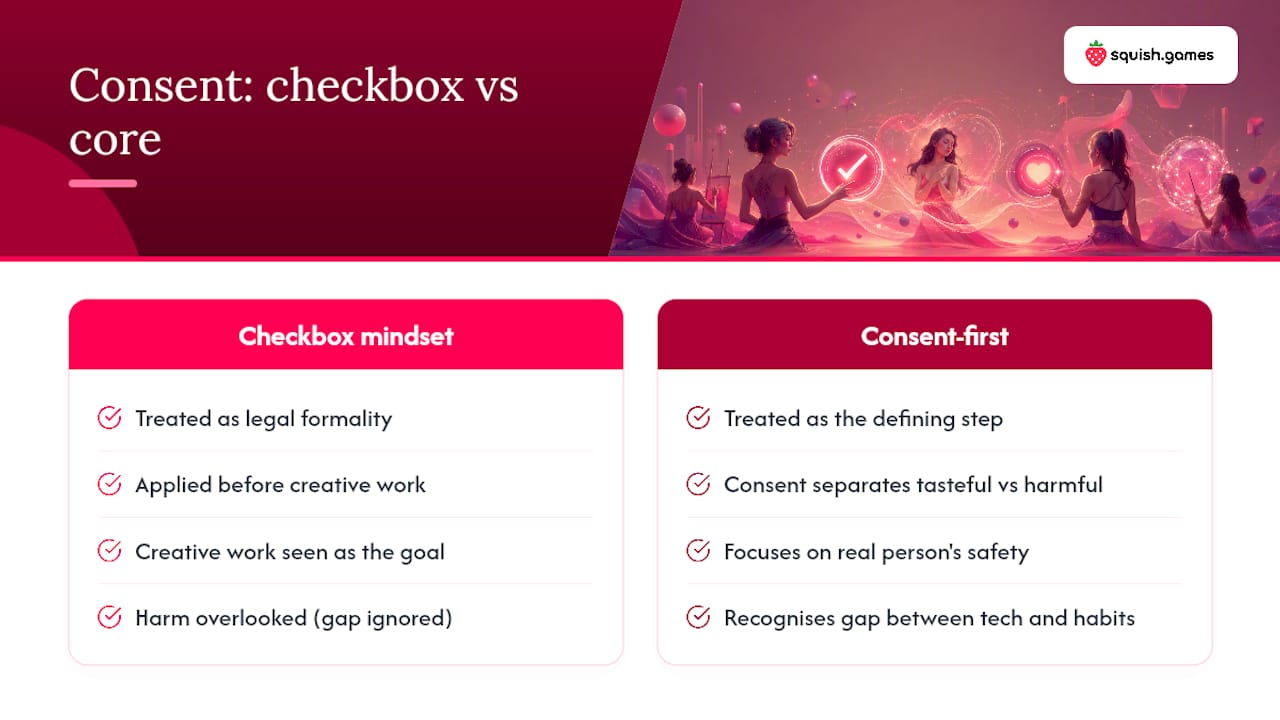
The technology here has moved faster than most people’s habits around it. Motion models like Seedance 2.0 can now produce fluid, cinematic movement that would have needed a studio a few years ago, which means the barrier to making something is nearly gone. The barrier to making something responsibly hasn’t moved at all. That gap is where most of the real harm in this space comes from, not from the tools themselves.
The platform builds its service around avatars, fantasy characters and consenting adult uploads specifically because that removes the ambiguity. You’re not left guessing whether a likeness is fair game. For deeper guidance on working with avatars and original characters, the fantasy video generator guide is worth a look.
— Jason
Start your first sexy AI clip on Squish today
The platform is designed for the workflow this article walks through: upload a photo, an avatar, a pet, or a fantasy character, pick an effect, and generate a short, social-ready clip without touching a single editing tool.
It is free to start, supports avatar and fantasy content alongside real photos, and runs on a consent-first policy with NSFW-safe options for adult creators who want that access. That combination, no editing skills required, avatar support, and adult content handled properly rather than bolted on, is hard to find in one place. Most generators make you choose between ease of use and creative range; Squish doesn’t ask you to pick.
If you’re ready to try it, the step-by-step guide to AI video creation with no editing skills walks through your first upload and generation in a few minutes. Sign up, choose your image or avatar, pick your effect, generate, and share.
Where to find more examples and community feedback
- Patreon’s AI video collections for curated adult content to browse
- ElevenLabs for pairing voice and lip-sync with animated clips
- A Discord community for shared prompts and feedback from other creators
- VoiceBros’ AI voice-over comparison for choosing between synthetic and human audio
- Squish’s image animation best-practice guide for fixing common artefacts
Leave a Reply