

Mobile AI video creation is the process of generating and editing AI-powered videos entirely on a smartphone, giving digital artists the freedom to produce uncensored nude art and adult content without a desktop studio. Tools like Google’s Veo 3.1 via AI Studio and Adobe Premiere AI Video Editor have made this accessible to any creator with a phone and a clear prompt. This mobile AI video creation guide covers the apps worth using, how to write prompts that actually work, a complete six-step workflow, and the legal rules you cannot afford to ignore when working with nudity in AI-generated content.
Which mobile apps are best for AI video creation with nudity?
The strongest mobile AI video tools in 2026 fall into two categories: generation models and editing apps. You need at least one of each for a complete workflow.
Google AI Studio with Veo 3.1 is the leading generation option on iOS and Android. Veo 3.1 produces cinematic-quality clips with strong motion coherence, making it well suited to figure work and artistic nude compositions. The model supports 9:16 vertical output natively, which is the correct format for TikTok, Instagram Reels, and most adult platforms.
Adobe Premiere AI Video Editor handles the post-production side. It offers unlimited timeline tracks, instant background removal, AI auto-captioning, and aspect-ratio resizing, all on mobile. That combination covers everything from trimming a raw generation to adding captions before posting.
For creators focused on image-to-video generation, platforms like Squish offer a free-to-start route that converts a single uploaded image, whether a selfie, AI character, or original nude artwork, into a short animated clip without requiring any editing skill.
| App / Model | Primary function | Nudity support | Output format |
|---|---|---|---|
| Google AI Studio (Veo 3.1) | Text-to-video generation | Synthetic only, policy-dependent | 9:16, 16:9, 1:1 |
| Adobe Premiere AI Video Editor | Mobile editing and post-production | Not applicable (editor only) | All major formats |
| Squish | Image-to-video, interactive animation | Consenting adult uploads, NSFW available | Short clips, vertical |
Pro Tip: Always check a model’s current content policy before generating nudity. Policies update frequently, and a generation that worked last month may now be filtered.
How to craft prompts for AI nude art videos on mobile
Effective prompts stay under 60 words on mobile. That constraint forces clarity and reduces failed generations significantly.
Structure every prompt like a brief production note. The four components are: subject and action, setting and lighting, camera movement, and audio or dialogue. Each component earns its place. Anything that does not change the output gets cut.
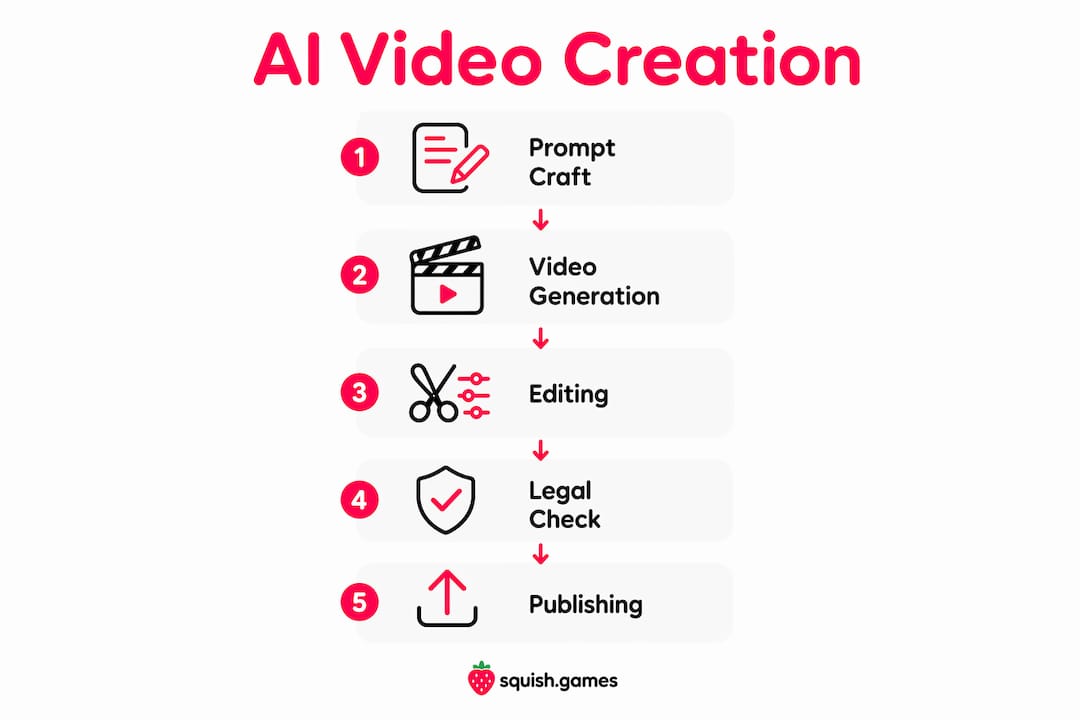
A prompt for an artistic nude figure video might read: “A nude female figure, standing in soft golden-hour light, slow camera pull back, ambient wind sound, painterly aesthetic, 9:16 vertical.” That is 22 words. It covers every component without padding.
Common mistakes on mobile include stacking too many adjectives, describing emotions rather than visuals, and forgetting to specify aspect ratio. Pruning prompts to subject, action, setting, camera, and audio consistently improves output quality and cuts wasted iterations.
- Write the subject and action first. Be specific: “nude figure reclining” beats “a person lying down.”
- Add setting and lighting in one phrase: “marble studio, diffused natural light.”
- Specify camera movement: “slow dolly forward” or “static wide shot.”
- Include audio intent: “ambient silence” or “soft piano.”
- State aspect ratio and duration at the end: “9:16, 5 seconds.”
Build a reusable prompt library. Save every prompt that produces a strong result. Over time, you will identify which phrasing patterns your chosen model responds to best, and your generation success rate will rise noticeably.
Pro Tip: Keep a notes file on your phone with your ten best-performing prompts. Swap one variable at a time to test variations rather than rewriting from scratch.
Step-by-step workflow for mobile AI nude art video production
A complete mobile workflow runs from generation to posting without ever leaving your phone. The six steps below apply whether you are using AI Studio, Squish, or any comparable AI-powered video maker.
- Choose your app and model. Open AI Studio and select Veo 3.1, or open Squish and upload your source image. Match the tool to your content type: text-to-video for original compositions, image-to-video for animating existing nude artwork.
- Write your prompt. Follow the four-component structure above. Keep it under 60 words. Specify 9:16 for social-first content.
- Set format and duration. Select aspect ratio and clip length before generating. Three to five seconds is the standard for social platforms. Ten seconds suits portfolio or editorial work.
- Generate multiple takes. AI video output is stochastic, meaning each generation is random within the parameters you set. Generate at least three takes per prompt. The third take frequently outperforms the first two.
- Review on your phone screen. Watch each clip on the device at actual viewing size. Clips reviewed on a small viewport reveal framing and lighting issues that look fine on a desktop. Reject any clip where the visual hook in the first one to two seconds is weak.
- Edit and post. Trim in Adobe Premiere AI Video Editor or your preferred AI video editing app. Add captions if the platform requires them. Export at the platform’s recommended bitrate and post directly from mobile.
A few additional points for nude art content specifically:
- Label adult content correctly before uploading. Most platforms require an explicit content flag at the point of upload.
- Keep your raw generations and prompt logs. They form part of your compliance record if a platform queries the content later.
- Avoid using realistic likenesses of real people without documented consent. Synthetic-only compositions carry far fewer legal obligations.
Design 9:16 as a core creative constraint, not just an export setting. Compose your prompts with vertical framing in mind from the start. A figure that fills a vertical frame reads very differently from one cropped from a landscape shot.
What are the legal rules for AI nudity content on mobile?
Legal compliance for AI-generated nudity is not optional. The rules differ depending on whether your content depicts a real person or a purely synthetic figure.
Under 18 U.S.C. §§ 2257 and 2257A, any sexually explicit content that depicts a real person requires detailed consent and identity records. That means signed model releases, copies of government-issued ID, and documentation of age verification. Platforms like Sozee operationalise this through formal verification workflows before a creator can publish adult content featuring real likenesses.
Purely synthetic AI content, where no real person’s likeness is used, is exempt from 2257/2257A record-keeping requirements. That distinction matters enormously for mobile creators working with AI-generated characters, avatars, or fantasy figures. It is the reason many artists choose synthetic-only compositions for their nude art work.
Platform policies vary widely and change frequently. OnlyFans permits AI explicit content only when it features a verified creator’s own likeness and is clearly labelled. FanVue welcomes AI content with a revenue-share model. Fansly bans AI-generated content entirely. Knowing the rules of each platform before you post saves you from account termination.
Key compliance principle: Store all consent forms, government IDs, and model releases securely alongside your AI assets. For any content depicting real persons, this documentation must be retrievable on request. Synthetic-only content requires no such records, but clear labelling of AI origin is still best practice on every platform.
Safety tips for maintaining creator control:
- Never use a real person’s face or body without written consent, regardless of how the image was generated.
- Watermark or metadata-tag your original AI outputs to establish provenance.
- Review each platform’s adult content policy quarterly. Rules shift faster than most creators expect.
Common challenges when creating AI nude art videos on mobile
The most common frustration in mobile AI video creation is inconsistent output quality. AI generation is stochastic by design. No two generations from the same prompt are identical, and some will simply miss the mark on lighting, anatomy, or motion.
The fix is volume and selection, not prompt perfection. Generate three takes as a minimum. Review each one critically on your phone screen. Reject clips with poor framing, visible artefacts, or weak motion in the first two seconds. The best clip selection process is fast once you know what a strong hook looks like.
- Lighting artefacts: Soft, diffused lighting prompts produce fewer artefacts than harsh directional light. If you see banding or unnatural shadows, adjust the lighting descriptor in your prompt.
- Anatomy errors: Current models occasionally distort limbs or proportions in nude figure work. Generating more takes is more efficient than trying to correct this in post.
- Prompt drift: Long prompts cause models to weight some descriptors over others unpredictably. Keep prompts under 60 words and test one change at a time.
- Platform content moderation: Some platforms auto-flag nude content even when it is correctly labelled. Build a buffer of approved clips so a moderation delay does not stall your posting schedule.
Pro Tip: Version your prompts. When a prompt produces a strong result, save it with a version number and note what you changed. This turns your prompt library into a repeatable creative system rather than a collection of lucky accidents.
Managing iteration waste is the other major challenge for mobile creators. Generating ten takes to find one usable clip feels inefficient. The solution is a tight prompt and a clear visual goal before you generate. Creators who build a prompt library of proven structures reduce wasted generations and spend more time on the creative decisions that matter.
Key takeaways
Mobile AI video creation for nude art requires tight prompts, a disciplined workflow, and clear legal boundaries around real-person depictions.
| Point | Details |
|---|---|
| Prompt length matters | Keep mobile prompts under 60 words using subject, action, setting, camera, and audio. |
| Generate multiple takes | Produce at least three takes per prompt and select the strongest visual hook. |
| Review on your phone | Watch clips at actual mobile viewing size to catch framing and lighting issues early. |
| Know the legal line | Synthetic AI figures need no 2257 records; real-person depictions require signed releases and ID. |
| Platform rules differ | OnlyFans, FanVue, and Fansly each have distinct policies on AI nudity content. |
Why discipline beats creativity in mobile AI nude art
The creators I see producing the strongest AI nude art on mobile are not the ones with the most artistic ambition. They are the ones with the tightest workflows. A well-structured prompt and a clear review process consistently outperform raw creative instinct when the generation model is doing the heavy lifting.
The tools available in 2026, particularly Veo 3.1 and the image-to-video capabilities on platforms like Squish, are genuinely powerful. But they reward discipline. A vague prompt produces a vague video. A prompt with a clear subject, a specific lighting condition, and a defined camera move produces something you can actually use.
The legal side is where I see creators make the most costly mistakes. The distinction between synthetic AI content and realistic likenesses is not a technicality. It is the line between a straightforward publishing workflow and a compliance obligation that requires documentation, storage, and ongoing management. If you are working with purely synthetic figures, your workflow is simple. If you are incorporating real likenesses, treat the paperwork as part of the creative process, not an afterthought.
My honest advice: start with synthetic-only compositions. Master the prompt structure. Build your library. Then, if your creative vision requires real-person content, approach the compliance requirements with the same rigour you bring to the art itself. The freedom to create uncensored nude art on mobile is real. Protecting that freedom requires knowing exactly where the boundaries are.
— Jason
Squish: free AI video tools for adult content creators
Squish is a free-to-start AI video platform built for mobile-first creators who want to animate images without editing skills. Upload an original nude artwork, AI-generated character, or consenting adult photo, and Squish turns it into a short animated clip, dancing image, or interactive effect ready for social sharing.
Squish supports NSFW and adult content with a consent-first approach, making it one of the few platforms where nude art creators can experiment freely without hitting content walls. The free adult AI video maker handles image-to-video generation directly on mobile, and the image-to-video effects guide walks you through getting strong results from a single photo. For creators building a portfolio, the AI video art portfolio guide covers how to present and monetise your work.
FAQ
What is mobile AI video creation?
Mobile AI video creation is the process of generating and editing AI-powered video clips entirely on a smartphone, using apps like Google AI Studio with Veo 3.1 or image-to-video platforms like Squish.
Can I create nude art videos with AI on my phone?
Yes. Platforms that support adult content, including Squish, allow consenting adult uploads and NSFW AI video generation. Purely synthetic AI figures carry no 2257 record-keeping obligations under US law.
How long should my AI video prompts be?
Keep mobile prompts under 60 words, structured as subject, action, setting, camera movement, and audio. Shorter, focused prompts produce more coherent outputs and fewer failed generations.
Do I need legal documentation for AI nude art?
Synthetic AI content with no real-person likeness requires no 2257 documentation. Content depicting a real person in sexually explicit AI video requires signed releases and ID stored securely alongside your assets.
Which platforms allow AI-generated nudity?
FanVue welcomes AI content with a revenue-share model. OnlyFans permits it with verified creator likeness and explicit labelling. Fansly bans AI-generated content entirely. Always check current platform policies before posting.
Leave a Reply