

A meme face animation is any looping GIF or short clip where a face reacts, swaps, or morphs inside a familiar template. The fastest route to one is an AI image to video tool or a GIF face swap app: upload a photo, let the model handle motion and blending, then export. Consent matters here, so pick a tool with clear controls over who and what gets animated, including NSFW settings if that’s your use case.
TL;DR:
- Most tools use face tracking to ensure smooth animations and avoid flickering, with better results when the source face matches the template in angle and lighting.
- GIF remains the default format for memes because it plays automatically and silently across all platforms, with short loops of 2 to 3 seconds optimizing viewer engagement.
- Speed, ease of use, and output quality differ among tools; browser-based face swapgers excel in rapid results, while full video generators produce more original motion at a cost of longer render times.
- To increase sharing potential, keep the punchline visible within the first second, ensure animations are muted, and test multiple caption or crop variants for maximum impact.
- Squish offers a mobile-first, consent-respecting workflow that produces shareable animations in minutes, making it suitable for quick trend testing and adult content creation.
Table of Contents
- What is meme face animation, and how do you make one fast?
- Which file format should your meme face animation use?
- What features actually matter in an AI meme face tool?
- How do you make a meme face animation that actually gets shared?
- How Squish turns a selfie into a shareable animation
- Comparing animation tools by speed, ease, and output quality
- Fixing common meme animation problems
- When should you use a template versus editing by hand?
- Try Squish for instant, consent-first meme animations
- Where to find more meme animation resources
- Sources
What is meme face animation, and how do you make one fast?
“Meme face animation” isn’t the industry’s original term. Motion designers call this facial reenactment, face swapping, or image to video synthesis, depending on the technique. Whichever label you use, the workflow behind it follows the same logic: a still photo goes in, an AI model predicts motion or maps a new face onto existing footage, and a looping file comes out the other end.
Two paths get you there. Template swaps take a single portrait and drop it into a pre-built animation, a reaction, a dance, a wink. Face swaps go the other direction: you take an existing GIF or video and replace the face inside it, frame by frame. The second method needs sharper tracking, because processing each frame while following the head across the whole clip is what stops the result looking jittery or half-melted.
Here’s the workflow, whichever path you pick:
- Choose your source. A single front-facing photo works for template swaps. A GIF or short video clip is what you need for a face swap into existing footage.
- Prep the photo. Face the camera directly, use even lighting, and keep the background plain. A one or two second static frame is plenty. Skip sunglasses, extreme angles, and heavy shadow across the eyes.
- Upload and pick a style. Choose an animation template or drop your face into a GIF. Most tools show a live preview before you commit any credits, and you can explore best lyric video maker tools for indie artists as creative examples of short-form video tools for creators.
- Adjust the details. Nudge the crop, tweak timing, and add a short caption overlay if the joke needs one line of text to land.
- Export. A looping GIF suits chat apps; an MP4 suits anywhere sound or higher resolution matters.
- Test variants. Export two or three versions with different crops or captions and see which one actually gets shared.
That last step is the one creators skip and shouldn’t. Cardinal Blue’s meme app data points to single-photo workflows that let people land their face inside iconic templates in seconds, which only pays off if you’re iterating fast enough to test more than one idea.
Which file format should your meme face animation use?
Format choice is not cosmetic. It decides where your animation works and how good it looks once it gets there.
- GIF: loops automatically, plays with no audio, and is supported everywhere from group chats to social feeds without a tap needed to start playback.
- MP4: carries sound, holds up better at higher resolution, and is the right call when the joke depends on a sound effect or voice line.
- Lottie (JSON): a vector animation format, tiny in file size, built for apps and websites rather than social sharing. Marketplaces host ready-made meme-face Lottie files for designers who need something lightweight and scalable.
On export settings: aim for a loop lasting a few seconds and a moderate frame rate to balance quality and file size, and stay under most chat apps’ size caps, typically a few megabytes for GIFs.
Statistic in context: GIFs remain the default meme format precisely because autoplay and silence are the two things every platform supports without exception, which is a large part of why they still outlast fancier alternatives.
What features actually matter in an AI meme face tool?
Most tools promise “instant” results. Few actually deliver clean ones. Here’s what separates a smooth swap from something that looks like a face melting in real time.
- Frame-by-frame face tracking. Tools that follow head position across every frame, rather than pasting a static face onto moving footage, avoid the flicker and drift that ruins a swap.
- Template range. Look for reaction faces, changing-face formats, dance loops, and subtle expression shifts, not just one gimmick repeated with different filters.
- Export policy. Check for watermarks, output resolution limits, and how long files take to render. A tool that takes two minutes to spit out a 3 second GIF is not built for iteration.
- Privacy and consent controls. You want clear settings over who can be depicted, what happens to uploaded photos, and, where relevant, explicit NSFW toggles rather than content that slips through by accident.
Pro Tip: Run the same photo through a tool’s free preview before spending any credits on the final export. If the preview shows warping around the eyes or mouth, the full-resolution version will show it worse.
Mobile-first design matters more than most people rate it. If a tool needs a desktop browser and a five-step account setup before you can upload one selfie, it’s built for a different decade of internet behaviour.
How do you make a meme face animation that actually gets shared?
Virality has a shape, and it’s smaller than most people think.
The joke needs to read inside the first loop, full stop. If a viewer has to watch a GIF twice to understand what’s funny, it’s too slow. Trim dead frames at the start and end until the punchline hits within the first second.
Sound is not guaranteed. Most feeds autoplay muted, so the gesture, the eyebrow raise, the double take, needs to carry the joke on its own. Save dialogue-dependent gags for MP4 posts where sound is expected.
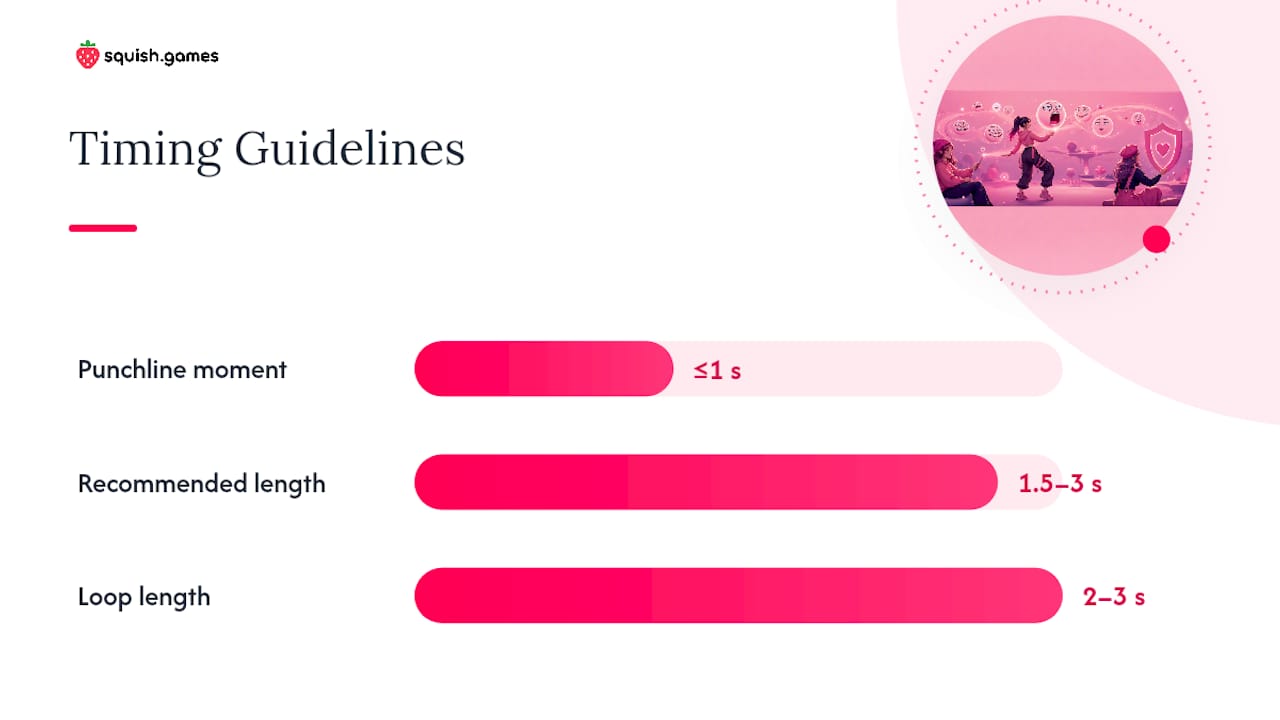
Length matters more than people assume: one and a half to three seconds with a clean loop point beats a longer clip that meanders. Recognisable framing helps too. Classic reaction poses land faster than original compositions because the audience’s brain fills in the context before the punchline even finishes.
Treat every animation as a draft. Practitioner advice on AI meme tools is consistent on this point: let the software handle the technical heavy lifting so your time goes into testing captions and crops, not fighting render settings.
| What to check | Why it matters |
|---|---|
| Punchline visible in first second | Viewers rarely rewatch a slow GIF |
| Works muted | Most platforms autoplay without sound |
| Loop length 2 to 3 seconds | Longer loops lose attention before they repeat |
| Recognisable framing or pose | Familiar templates land faster than originals |
| 2 to 3 caption variants tested | The best caption is rarely the first one you write |
How Squish turns a selfie into a shareable animation
Squish’s workflow strips the process down to three moves: upload, pick an effect, export. A photo, an AI-generated image, an avatar, or a pet picture goes in; a short animated or dancing video comes out, usually within a couple of minutes on a phone.
What sets the flow apart in practice:
- No editing skills required. Templates handle the motion, so you’re choosing an effect rather than keyframing anything by hand.
- Consent-first uploads. Squish is built for selfies, original images, licensed creator content, and consenting adult uploads, with NSFW and adult content available for those who want it, gated appropriately rather than left open by accident.
- Mobile-first from the start. The upload-to-export loop is designed for a phone screen, not a desktop timeline.
- Fast iteration. Because exports are quick, testing two or three versions of the same animation costs minutes, not an editing session.
For a direct walkthrough, Squish’s guide to turning a photo into a meme covers the exact tap-by-tap sequence, and the photo animation effects guide breaks down export settings for different platforms.
Comparing animation tools by speed, ease, and output quality
Not every tool optimises for the same thing, and knowing which category you’re in saves wasted uploads.
Browser-based GIF face swappers are built for speed above all. You upload an existing GIF, the tool tracks the head across every frame, and you get a result in seconds. Output quality depends entirely on how well the tracking holds up on fast motion. A GIF where the subject’s head barely moves will swap cleanly; one with rapid turns often shows edge artefacts around the jawline.
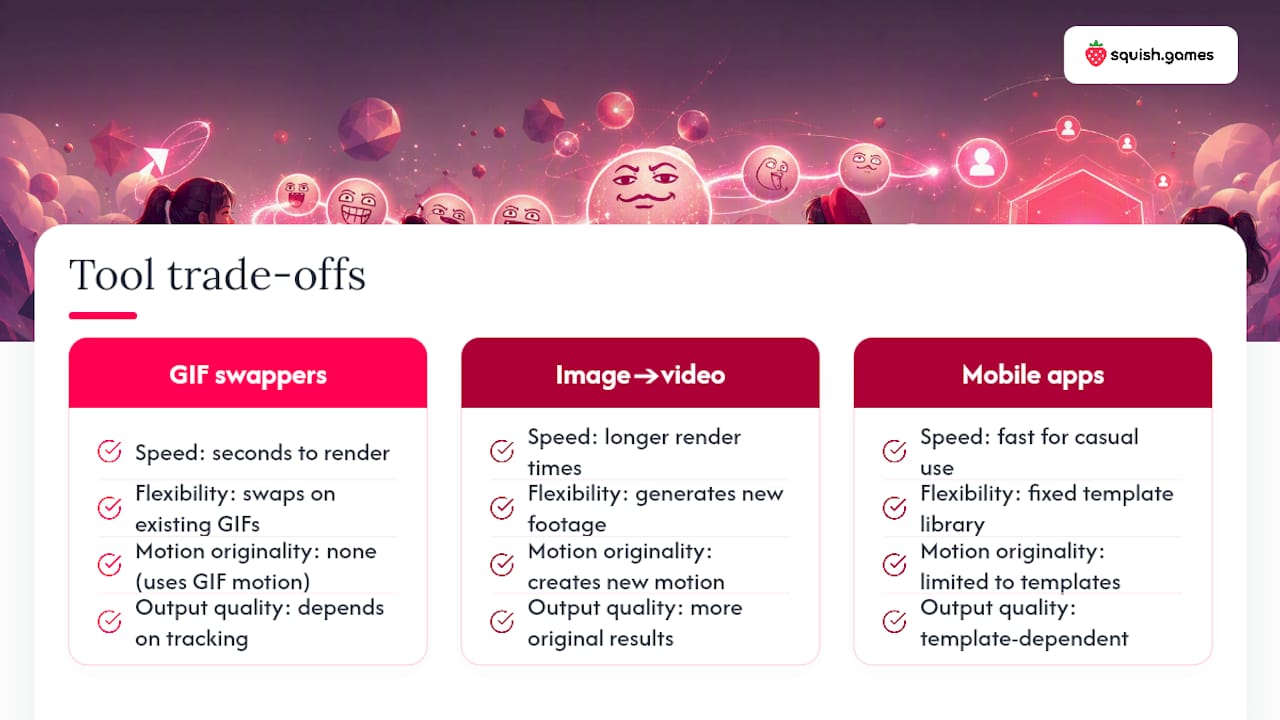
Full image to video generators sit at the other end. They don’t just swap a face into existing footage, they generate new motion from a still photo, which takes longer to render but produces more original results. These suit creators who want a genuinely new clip rather than a remixed template.
Mobile apps built specifically for meme templates split the difference: fast enough for casual use, with a fixed library of poses rather than open-ended generation. That trade-off, less flexibility for more speed, is exactly why they’re popular for one-off jokes rather than a body of original work.
The honest takeaway: pick based on what you’re making, not which tool has the flashiest demo. A five-second reaction GIF and a fifteen-second dancing avatar clip are different jobs with different ideal tools.
Fixing common meme animation problems
Most meme face animations break in one of three predictable places.
Misalignment shows up when the source face and the target template don’t share similar angles or lighting. If your selfie is lit from the left and the template face is lit from the right, the swap will look pasted on regardless of how good the tool is. Fix it by choosing a source photo whose lighting and head angle roughly match the template, or by picking a template style built for frontal photos if that’s what you’ve got.
Flickering happens when a tool treats each frame independently instead of tracking the face’s position continuously through the clip. This is the exact problem frame-by-frame tracking with consistent head positioning is designed to solve, and it’s the single biggest quality difference between tools in this space.
Looping problems, a visible jump or stutter where the animation restarts, usually trace back to mismatched first and last frames. If the source clip doesn’t end where it began, the loop point will always show a jolt. Trim a frame or two off either end until the motion flows smoothly back to its start, or choose a template specifically built to loop rather than one designed for single playback.
File size rejections on chat apps are almost always a frame rate or resolution issue. Dropping from 30fps to 20fps, or shrinking resolution slightly, usually solves it without a visible quality hit.
When should you use a template versus editing by hand?
AI templates win on speed and volume: they’re the right call when you’re chasing a trend before it dies or testing ten ideas to find the one that lands. Manual editing still earns its place when a piece needs a specific narrative beat or an emotional register no preset captures. Knowing which job you’re doing saves hours.
— Jason
Try Squish for instant, consent-first meme animations
Squish is the fastest route from a single photo to a shareable animation, and it’s built to handle both the playful and the adult end of that spectrum without forcing you through a desktop editing suite to get there.
Where a browser-based face swapper handles one GIF at a time, Squish generates original motion from your upload, whether that’s a selfie, an avatar, a pet photo, or licensed creator art, and gives you clear controls over consent and NSFW access rather than leaving that gated behind fine print. The whole loop, upload, pick an effect, export, runs on a phone in a couple of minutes, with premium and adult content unlocked through in-app credits once you’ve tried the free version.
Start with the AI video creation guide with no editing skills needed and upload your first photo to see the effect library for yourself.
Where to find more meme animation resources
For ready-made templates and further reading beyond this workflow:
- Meme Face GIFs on Tenor for browsable reaction templates
- Lottie meme face collections on Iconscout for lightweight app-ready assets
- Squish’s beginner guide to AI photo animation for a low-friction first upload
- Squish’s best practices for animating faces for avoiding common artefacts
Sources
- GIF Face Swap — Swap Faces in Any GIF Instantly AI
- Meme Face GIFs
- Meme Face Animations – Free Download in GIF, Lottie JSON
- MemeMe: AI Meme Maker – Apps on Google Play
Leave a Reply