

Jiggle physics animation, in the way most people mean it today, is an AI tool that turns a still photo into a short video where hair, clothing or body parts bounce naturally. The fastest route is simple: upload a clear photo to an AI generator like Squish Games, pick a jiggle or dance template, preview the motion, then export a short loop ready for TikTok, Reels, or a private save.
TL;DR:
- Clear, high-resolution photos with even lighting and minimal occlusion significantly improve the realism of jiggle effects.
- Most consumer jiggle tools generate short loops of four to five seconds, optimizing visual coherence across social media formats like TikTok and Reels.
- Always obtain explicit consent before animating someone else’s image, especially for adult or NSFW content, and keep documentation for legal safety.
- Output quality is primarily limited by the source image quality and pose complexity, making better photos and simpler poses crucial for convincing results.
- Budget and older smartphones can generally produce satisfactory clips, but higher-quality images and stable internet improve processing and final video quality.
Table of Contents
- What Is Jiggle Physics Animation, Really?
- How Do You Make A Jiggly Clip In Three Steps?
- Which Photos Give You The Most Realistic Wobble?
- Is It Okay To Animate Someone Else’s Photo?
- Why Does My Jiggle Effect Look Off?
- Where Do Jiggle Clips Actually Get Used?
- What’s Actually Happening Under The Hood?
- How Do The Main Jiggle Tools Compare?
- Does This Work On A Basic Phone?
- What Are The Bigger Ethical Questions Here?
- Why This Format Deserves More Respect Than It Gets
- Try Squish Games: Make Your First Jiggle Clip Today
- Where To Learn More
- FAQ
What Is Jiggle Physics Animation, Really?
Forget the game-development definition for a moment. In consumer apps, jiggle physics animation describes AI software that studies a photo, works out where the soft, moveable parts are (hair, fabric, flesh), and generates convincing bounce and sway without anyone touching a single keyframe. There’s no rigging, no timeline, no simulation settings to learn.
This matters because the term has two very different lives. Game engines use “jiggle physics” to describe soft-body simulation rigs built by developers inside tools like Unity or Unreal. That’s a technical discipline for people who write code and tune bone weights. The consumer version, the one this article covers, is the opposite: point a phone camera at something, upload it, and let an AI model do the physics guesswork for you.
The appeal is obvious once you’ve seen one done well. A static profile photo becomes a looping clip where hair sways with a turn of the head. A pet photo gets a bouncy little wiggle. An avatar or fantasy character starts to dance. It’s playful, it’s shareable, and it takes roughly the same effort as picking an Instagram filter, which is exactly why it has become a favourite low-effort, high-engagement content tactic for creators building short-form audiences. None of it requires animation training, and platforms built for this, including Squish Games, are designed so the entire process happens on a phone in a couple of minutes.
How Do You Make A Jiggly Clip In Three Steps?
You don’t need editing software or a tutorial series. The workflow behind most jiggle effect apps boils down to three moves: prepare the photo, choose and tune the effect, export for your platform.
- Pick and prepare your photo. Use a well-lit, reasonably high-resolution image where the subject is clearly visible and not obscured by props, other people, or heavy shadow. A half-body or full-body shot with a clean background gives the AI the clearest read on where hair, clothing, or body contours actually sit.
- Choose the jiggle type and tune it. Select a preset (bounce, sway, dance, wiggle) and adjust the intensity and direction if the app allows it. Preview the output before committing. Most tools let you nudge the effect up or down a notch, which is worth doing before you export, since a first pass is rarely the final one.
- Export for where it’s going. Pick MP4 for most social feeds or GIF if you want something that loops instantly in messaging apps. Vertical crop for TikTok and Reels, square or landscape for other platforms. A short loop is the standard default across most consumer tools, and it’s the length that tends to hold up best without artefacts creeping in.
Pro Tip: Generate two or three variations at different intensities before you pick a favourite. The “just right” jiggle setting for a portrait is rarely the same one that works for a full-body dance clip, and previewing costs you nothing but a few seconds.
Which Photos Give You The Most Realistic Wobble?
The single biggest factor in output quality isn’t the app, the preset, or even the AI model underneath it. It’s the photo you feed it. One-click animation tools have removed almost every technical barrier to entry, but they still depend on a clear, well-composed source image to simulate soft-body motion convincingly.
A handful of habits separate a jiggle clip that looks eerily good from one that looks like it’s fighting itself:
- Shoot in even lighting so the AI can distinguish edges, fabric folds, and hair strands cleanly.
- Choose half-body or full-body framing over tight close-ups when you want visible movement across clothing or hair.
- Avoid busy props, crossed arms, or anything that occludes the areas you want to jiggle.
- Match your preset to your subject type. Photoreal portraits, illustrated avatars, and pet photos each respond better to different intensity curves.
- Keep loops to the default 4 to 5 seconds unless you’re specifically testing longer output, since most consumer tools are tuned around that window.
Quick stat: consumer jiggle and dance outputs default to short loops for a reason. That length is what performs best across TikTok, Reels, and GIF formats, and it’s short enough that motion coherence rarely breaks down.
Style choice changes more than the mood of the clip. A photoreal selfie needs a subtler jiggle curve than a cartoon avatar, which can carry a more exaggerated bounce without looking broken. If you’re animating digital art rather than a photo, the best practices for animating AI images differ slightly from photo workflows, mostly around how much detail the source illustration needs before the AI can read it properly.
Is It Okay To Animate Someone Else’s Photo?
Consent comes first, always. Before you animate a real person, get their explicit agreement, especially for anything adult or NSFW, and keep a record of that consent. This isn’t a bureaucratic box-tick; it’s the difference between playful content and a genuine violation of someone’s likeness.
A few non-negotiables worth running through before you post anything:
- Confirm you have the right to use the source image, whether it’s your own selfie, a licensed asset, or creator-owned artwork.
- For adult or NSFW content, verify the subject is a consenting adult and keep documentation of that consent.
- Check the platform you’re posting to for its own age verification and content rules before sharing.
- Respect copyright on any third-party image, avatar, or character design you didn’t create yourself.
Squish Games builds this thinking into the platform itself: consent-first creation applies across selfies, AI-generated characters, pets, fantasy art, and adult content alike, so users aren’t left guessing where the line sits.
Pro Tip: Keep a simple screenshot or written confirmation of consent whenever you animate someone else’s photo, particularly for NSFW work. It costs you thirty seconds and protects you if a platform or the subject ever raises a question later.
Why Does My Jiggle Effect Look Off?
Most quality problems trace back to one of four causes, and each has a quick fix.
- Blurry or low-resolution source image. If the output looks smeared or the AI seems to be guessing at edges, reshoot with better lighting or a higher-resolution camera. This is the single most common cause of a disappointing result.
- Floating limbs or unnatural wobble. Dial the effect intensity down a notch, or switch to a pose with less overlap between limbs and torso. Complex poses ask more of the simulation than the AI can reliably deliver.
- Background jitter. Crop tightly to the subject before uploading, or use background stabilisation if your tool offers it. A busy or moving background gives the AI conflicting motion cues.
- Beat-sync problems on dance clips. Shorten the loop, or feed the tool a motion-reference clip if that option exists. Basic animation tools rely on local interpolation frame to frame, and that approach tends to drift the longer a clip runs, so a shorter loop is almost always more reliable than a longer one.
If you’re specifically trying to sync movement to music, it’s worth looking at how musicians approach AI workflows for beat-matched content, since the same interpolation issues that affect dance clips show up in music production tools too.
Where Do Jiggle Clips Actually Get Used?
The format earns its place because it’s built for feeds people scroll fast. A short loop works as a TikTok clip, a Reels post, or a GIF that auto-plays in a group chat, and vertical cropping keeps it native to mobile-first platforms rather than looking cropped or squeezed.
Beyond single clips, creators build small series: an avatar with a consistent jiggle style across posts, or a fantasy character that becomes a recurring bit. For bouncing photo effects tuned to Reels specifically, format matters as much as content.
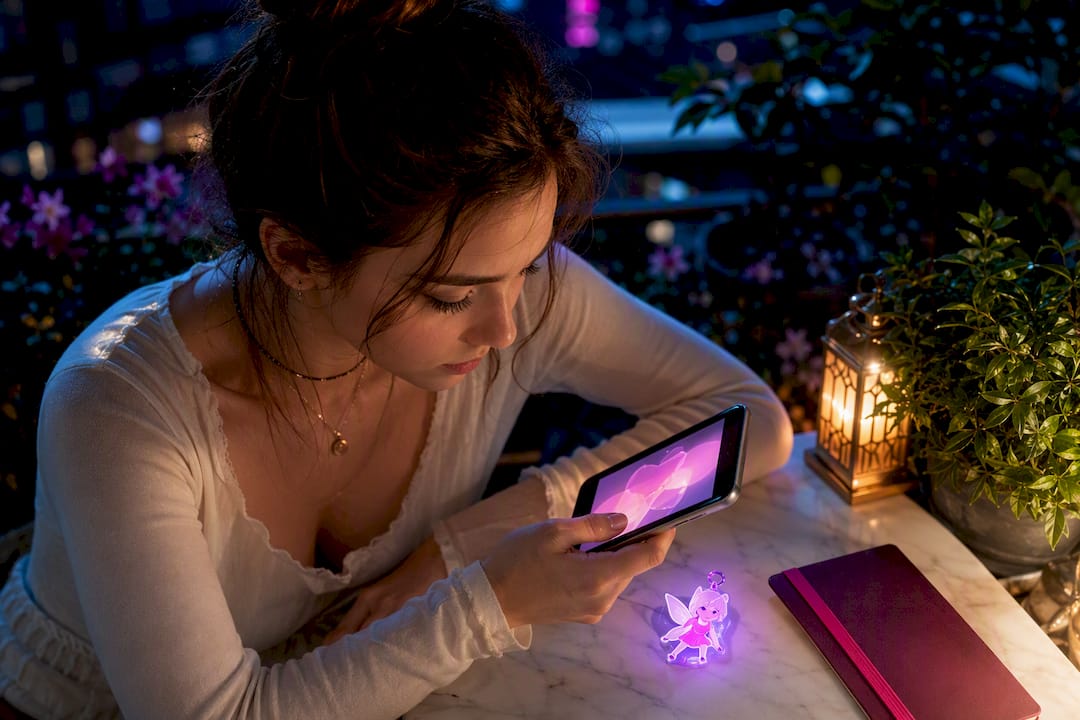
Adult-content creators get their own considerations. A consent-first preview clip, a blurred or cropped thumbnail, and a clear monetisation path let creators build audiences without exposing full content before a viewer has opted in. Outside of full posts, these clips repurpose well as story stickers, profile teasers, or short ad creative, stretching one upload into several pieces of content.
What’s Actually Happening Under The Hood?
The consumer jiggle tools you’re using don’t run a physics engine the way a game studio would. Instead, they combine pose detection with generative video models trained to predict plausible motion from a single frame. The AI first maps where a body, garment, or hair mass sits in the image, then generates a short sequence of frames where that region moves in a physically believable way, stretching, settling, and rebounding roughly the way real soft tissue or fabric does.
This is why image clarity matters more than any setting inside the app. One-click generators handle pose detection and the soft-body simulation automatically, which means your best lever as a creator isn’t a technical skill, it’s picking the right source photo and preset combination.
For longer or more complex sequences, better tools use a form of global motion planning, working out the whole clip’s movement arc before rendering it, rather than guessing frame by frame. Basic tools that rely purely on local interpolation, predicting each frame from the one before it, tend to accumulate small errors that show up as drift or jitter past the 4 to 5 second mark. That’s a large part of why most platforms default to short loops rather than longer, freeform clips: the underlying models are simply more reliable within that window.
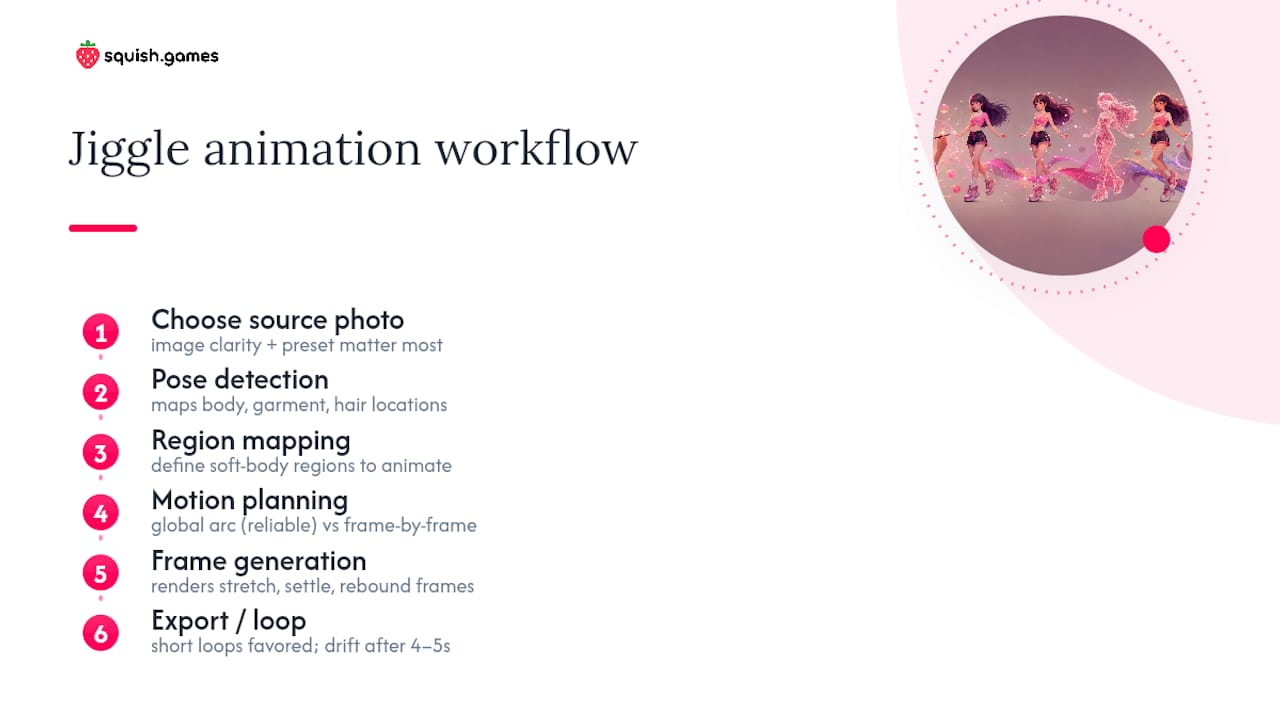
None of this requires the user to understand any of it. The entire appeal of AI wiggle effect tools is that the simulation complexity stays invisible, and the creative decisions (photo, pose, style, intensity) stay in your hands.
How Do The Main Jiggle Tools Compare?
Not every jiggle effect app is built for the same job, and the differences show up quickly once you start comparing outputs side by side.
Entry-level photo filter apps tend to apply a generic wobble overlay regardless of what’s in the image. They’re fast and free, but the motion often looks pasted on rather than physically grounded, because there’s no real pose detection happening underneath.
Mid-tier AI animation apps improve on this by detecting the subject and applying motion presets tailored to body type, hair, or clothing. Output quality is noticeably better, though many are built primarily for general video effects rather than jiggle-specific presets, so intensity and direction controls can feel limited.
Consumer platforms purpose-built for jiggle, dance, and interactive photo animation, Squish Games among them, sit at the top of this range because the presets are designed specifically for bounce and wobble rather than repurposed from generic video filters. That specialisation shows up in finer intensity controls, cleaner loop handling, and support for a wider range of source content, including avatars, pets, and NSFW material under a consent-first framework.
The practical takeaway: if you’re testing jiggle effects for the first time, start with a platform built around this specific effect category rather than a general-purpose video app, since the presets will already be tuned for the kind of motion you’re after.
Does This Work On A Basic Phone?
Mostly, yes. The heavy computational lifting, the pose detection and video generation, happens on the platform’s own servers, not on your device. That’s the whole point of a mobile-first AI wiggle effect tool: your phone just needs to take a decent photo and hold a stable internet connection to upload it and download the result.
Where hardware starts to matter is on the input side. A phone camera from the last few years will produce sharp enough images for most presets. Older or budget devices with weak low-light performance are more likely to hand the AI a grainy or noisy source image, and that noise often gets amplified once the motion is applied, showing up as flicker or soft artefacts around edges.
Export size and format also affect how smoothly a clip plays once you’ve made it. Lighter MP4 exports load faster on mobile data and are the safer choice for most social uploads, while GIF files, though universally compatible, tend to be heavier for the same clip length and can lag on slower connections.
If you’re generating a lot of clips in one sitting, expect slight processing queues during peak hours, which is standard for any cloud-based generation service rather than a sign of anything wrong with your device. Patience during busy periods, plus a stable Wi-Fi connection for uploads, covers most of what you need on the hardware side.
What Are The Bigger Ethical Questions Here?
Consent covers the legal and personal boundary, but it doesn’t cover everything creators should think about. Representation is one blind spot worth naming directly: if presets or training data skew toward particular body types, skin tones, or gender presentations, output quality can quietly vary depending on who’s in the photo. That’s worth watching for, and worth raising with any platform whose results seem inconsistent across different subjects.
Realism raises a separate question. As jiggle and wiggle effects get more convincing, the line between “obviously AI-generated fun” and “content someone might mistake for real footage” gets thinner. Responsible creators label AI-generated content where context might otherwise mislead a viewer, particularly with real people’s likenesses. This matters more, not less, as the animation gets better.
There’s also a fairness dimension to NSFW and adult content specifically. Consent-first platforms exist precisely because AI-generated intimate content has real potential for misuse against people who never agreed to it. Treating that seriously, not just as a compliance checkbox but as a genuine ethical line, is part of what separates responsible creators from careless ones.
None of this means avoiding the format. It means using it with the same judgement you’d apply to any tool that can make convincing fakes: thoughtfully, transparently, and with the subject’s interests in mind, not just your engagement numbers.
Why This Format Deserves More Respect Than It Gets
Most people dismiss jiggle and wiggle effects as a novelty, a bit of throwaway fun that doesn’t deserve serious thought. That’s backwards. The format is a genuine engagement tool precisely because it’s low effort and instantly legible, and that combination is rare in content creation. Most tactics that perform well on short-form platforms require either skill or time. This requires neither, which is exactly why it spreads.
What gets underestimated is how much the ethical questions matter at scale. A single jiggle clip of a consenting friend is harmless fun. The same technology applied without consent, or applied carelessly to real people’s likenesses in adult contexts, is a different thing entirely, and the tools that take that seriously, building consent and documentation into the product rather than bolting it on afterwards, are doing something genuinely useful, not just covering themselves.
The other underrated point is that image selection has quietly become the real creative skill here. Anyone can generate an effect. Fewer people understand why one photo produces a convincing wobble and another produces a mess. That’s not a technical skill, it’s closer to a photographer’s eye, and it’s the one part of this whole process that AI hasn’t automated away.
— Jason
Try Squish Games: Make Your First Jiggle Clip Today
Squish gives you a faster route into this than almost anything else on the market: no editing software, no waiting for a manual render, no separate app for NSFW content. Upload a selfie, pet photo, avatar, or fantasy character, pick a jiggle or dance preset, and you’ve got a shareable clip in minutes, all under a consent-first policy that covers adult and NSFW uploads the same way it covers a portrait shot.
Start with something low-stakes: a favourite selfie or a pet photo, just to see how the preset intensity behaves before you commit to a bigger project. From there, the starter guide for making a photo dance with AI walks through the same steps covered here, but with screenshots for anyone who wants a visual reference.
Squish offers a free-to-start approach, with additional exports, higher resolution output, or access to premium and adult content features available through credits. Please visit the Squish website for the most current details on account features and pricing. For a broader look at what’s possible beyond a single jiggle clip, the 2026 guide to AI video creation with no editing skills covers the wider platform, including dancing images and interactive art formats. Upload your first photo and see the loop before you decide whether to take it further.
Where To Learn More
For deeper dives into the craft side of this, Squish’s own guides cover image animation best practices for digital artists and export formatting for social platforms. If motion syncing to music is part of your workflow, AI tools and workflows for musicians covers adjacent ground worth knowing.
FAQ
What Is Jiggle Physics Animation In Consumer Apps?
It’s an AI process that turns a still photo into a short video where hair, clothing, or body parts bounce or sway convincingly, generated automatically without manual animation skills.
How Long Should A Jiggle Clip Be?
Most tools default to a 4 to 5 second loop, which is the length that performs best on TikTok, Reels, and GIF formats while avoiding motion drift.
Do I Need Consent To Animate Someone’s Photo?
Yes, always get explicit consent before animating a real person, and keep a record of that consent, particularly for adult or NSFW content.
Why Does My Jiggle Effect Look Unnatural?
Unnatural results usually come from a blurry source photo, an intensity setting that’s too high, or a pose with too much limb overlap; fixing any of these three usually resolves it.
Can I Make NSFW Jiggle Content Legally?
Adult content is permitted on consent-first platforms like Squish Games when the subject is a verified consenting adult and platform age verification rules are followed.
Does Squish Games Support Pets And Avatars, Not Just Selfies?
Yes, Squish supports selfies, AI-generated characters, pets, and fantasy art alongside consenting adult content, all within the same consent-first framework.
Leave a Reply