

Short, tightly edited AI clips drive follower growth by turning one long asset into multiple discovery opportunities, each auditioning for new audiences across TikTok, Instagram Reels, and YouTube Shorts. The mechanism is straightforward: more clips mean more algorithmic auditions, and more auditions mean a higher probability that one breaks out and pulls followers back to your profile.
Three things to do in the next hour:
- Clip one long-form video or podcast episode into three candidate moments (aim for the sharpest 15–30 seconds each).
- Pick the candidate with the strongest opening frame — motion, a bold claim, or a visual surprise in the first two seconds.
- Post it to one platform with a caption and two or three relevant hashtags.
TL;DR checklist:
- One long asset can yield many publishable clips, providing volume as the discovery engine.
- Hook survives or dies in the first 1–2 seconds.
- Substance beats arbitrary shortness every time.
- Post consistently; cadence compounds faster than polish.
Table of Contents
- Why do short AI clips actually grow your following?
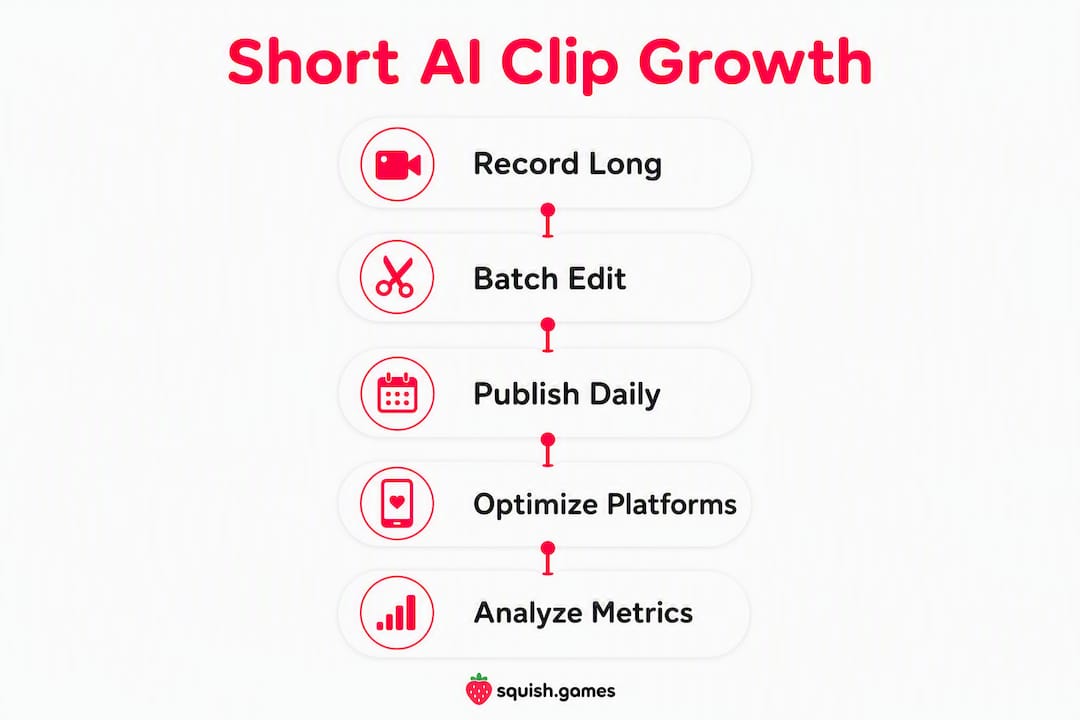
- A repeatable workflow for producing short AI clips from long-form content
- How do you structure hooks and pacing to turn views into followers?
- Platform-specific optimisation: TikTok, Instagram Reels, and YouTube Shorts
- What do tools, time, and cost look like for UK creators?
- What does the research actually say about clip performance?
- What are the most common mistakes that kill short AI clips?
- What should you check before you publish a clip?
- Why does repurposing long-form content multiply your reach?
- How do captions, hashtags, and posting consistency compound growth?
- What should you measure and how do you iterate quickly?
- Which AI tools should you use for clip generation?
- What are the legal and ethical rules for AI-generated content?
- How do you use AI clips to reach a specific niche audience?
- How do AI clips fit into a broader social media growth strategy?
- What do real creator campaigns show about AI clip growth?
- Key takeaways
- The thing most creators get backwards
- Squish Games fits directly into this workflow
- Further reading and useful tools
Why do short AI clips actually grow your following?
The algorithm does not promote content — it runs auditions. Every clip you post is entered into a small test pool. If enough viewers watch past the two-second mark, the platform widens distribution. YouTube Shorts exceeded an enormous number of daily views in recent years, which tells you the distribution pool is enormous. The question is whether your clip survives the first cut.
Human behaviour compounds this. Short-form viewers are not passive — they are swiping at speed, and their thumb stops only when something demands attention. Value-per-second is the real currency: a clip that delivers a payoff in every five-second window keeps viewers watching, and completion signals push the algorithm to show it to more people.
Platform differences matter more than most creators realise:
- TikTok rewards rapid re-hooks and audio-led energy; a clip that works silently rarely breaks out here.
- Instagram Reels favours aesthetic consistency and saves; a visually striking frame drives saves more reliably than a verbal hook alone.
- YouTube Shorts benefits from a tease-to-channel strategy, where the clip explicitly links to longer content and converts discovery into sustained subscriptions.
Understanding why short AI videos perform better than their long-form counterparts on these feeds comes down to one thing: they fit the audition model perfectly.
A repeatable workflow for producing short AI clips from long-form content
The goal is a batch of clips from a single recording session, not one perfect video.
- Record or source your long-form asset. A 20-minute video, podcast episode, or audio interview is ideal. Audio-first sources often outperform purely video-first content when repurposed into short clips, because the structure is already built for listening.
- Run it through an auto-clipper. Tools like CapCut’s auto-highlight or Runway’s scene-detection surface candidate moments automatically. Aim for 10–20 candidates per session.
- Rank candidates by hook strength, not virality score. Does the clip open mid-action or mid-claim? Is there visual motion in frame one? Use AI scores as a shortlist, then apply your own editorial judgement.
- Human-edit the top three. Trim the wind-up, tighten the ending, add captions. This step takes roughly 10–15 minutes per clip once you have a template.
- Export with platform-specific presets. 9:16 ratio, correct resolution, captions burned in or as a separate layer depending on the platform.
- Schedule across platforms. Use a tool like Buffer or Later to stagger posts across the week.
A sensible batching cadence: one long-form recording session per week yields a batch of clips to post daily. Creators who move from weekly to daily posting consistently report faster audience growth because the algorithm has more data to match them to the right viewers.
Pro Tip: Always manually verify the 0–2 second frame after the auto-clipper selects it. AI tools frequently choose a technically strong moment that opens on a wind-up rather than the action itself. Shift the start point by one or two seconds and your hook rate will improve immediately.

How do you structure hooks and pacing to turn views into followers?
The first two seconds are not a warm-up — they are the entire audition. Retention data shows that swipe-away decisions happen closer to 1–1.5 seconds in many successful clips, not the commonly cited three seconds.
Hook design rules:
- Open mid-action or mid-claim, never with a greeting or context-setting.
- Put visual motion in frame one: a cut, a zoom, a character moving, an effect triggering.
- Use audio contrast: a sharp sound, a voice starting mid-sentence, or music that drops on beat one.
Pacing rules:
- Re-hook the viewer every 2–4 seconds with a new visual or verbal beat.
- Padding kills clips, not length. A 70-second clip dense with substance consistently outperforms a padded 25-second clip. Cut filler, not content.
- End with a payoff, a loop, or an explicit CTA that earns the follow.
Micro-structure for a 30-second clip:
- 0–2s: Hook (visual motion + bold claim or question).
- 2–27s: Development (deliver the substance, re-hook every 4–5 seconds).
- 27–30s: Payoff or loop back to the opening frame to encourage rewatch.
Quick dos and don’ts:
- ✅ Start with the most interesting moment, not the beginning of the story.
- ✅ Use captions even when audio is on — they increase completion rates.
- ❌ Never open with your logo or channel name.
- ❌ Never pad to hit a perceived “ideal” length.
Platform-specific optimisation: TikTok, Instagram Reels, and YouTube Shorts
The same clip rarely performs identically across all three platforms without adjustment. Platform-specific scoring matters more than a single aggregate virality number.
| Feature | TikTok | Instagram Reels | YouTube Shorts |
|---|---|---|---|
| Ideal length | 15–30s (breakout), up to 60s | 15–30s | 30–60s |
| Caption style | Bold, large font, centred | Aesthetic, lower-third | Minimal or none |
| Audio | Original audio or trending sound | Trending audio or original | Original audio preferred |
| Thumbnail/frame | Auto-selected; first frame critical | Cover frame matters for grid | Custom thumbnail available |
| Hashtag count | 3–5 targeted | 5–10 mixed | 3–5 |
| Posting cadence | 1–3x daily | 1x daily | 1x daily |
| Platform fit | Audio-led energy, fast cuts | Visual aesthetics, saves | Tease-to-channel strategy |
For TikTok virality specifically, AI-generated effects and animated images tend to perform well because the platform’s audience actively engages with novel visual formats. On Reels, a striking still-to-motion effect (a photo that suddenly dances or bounces) drives saves and shares. On Shorts, the clip should tease a longer video explicitly — “full breakdown on the channel” converts short-form discovery into long-term subscribers.
What do tools, time, and cost look like for UK creators?
A solo UK creator using a freemium stack can produce a publishable clip in 20–40 minutes end-to-end, including review and captioning. One developer case study documented follower growth from 200 to 5,000 in 60 days after switching to an AI-driven workflow, with per-clip production time dropping from hours to minutes.
Typical cost expectations (UK, 2026):
A practical tool stack for UK creators:
- Image-to-video / AI effects: — Squish Games for photo animation, dancing images, and short AI clips from still images — free to start, with credits for additional generations.
The benefits of AI video creation for solo creators are primarily about removing the production bottleneck. When clip generation takes minutes rather than hours, posting daily becomes realistic rather than exhausting.
Stat to know: Creators who treat one long-form asset as a source of 20–40 publishable clips report large view uplifts when they increase posting cadence — the volume itself is the discovery mechanism.
What does the research actually say about clip performance?
Three findings hold up consistently across practitioner data and academic research:
- Volume is the engine. More clips from the same asset means more algorithmic auditions. The probability of a breakout clip rises with volume, not with any single clip being “perfect.”
- Hook rate predicts more than duration. Four metrics reliably predict breakout behaviour: first-3-seconds retention, average percentage watched, completion/rewatch rate, and shares/saves/follows per 1,000 views. Duration is not in that list.
- Platform calibration beats generic scores. A clip that scores well on a generic virality tool may still underperform on a specific platform because the scoring model was not trained on that platform’s engagement patterns.
Quick tests to run in 2–3 weeks:
- A/B open frames: Post two versions of the same clip with different start points (0s vs 2s into the original). Compare hook rates after 48 hours.
- Re-hook frequency: Edit one clip with a new visual beat every 3 seconds vs every 6 seconds. Compare completion rates.
- Cross-platform export: Post the same clip to TikTok and Reels on the same day. Note which platform’s audience responds and adjust your primary posting platform accordingly.
What are the most common mistakes that kill short AI clips?
Padding is the most frequent failure. It looks like a five-second intro, a logo animation, or a slow zoom before anything happens. The fix: cut to the interesting moment immediately, even if it feels abrupt.
Over-relying on a single virality score is the second pitfall. AI clipping tools are excellent at surfacing candidates, but they cannot detect a community-specific joke, a running reference, or a niche cultural moment that your audience will recognise. Use scores as a shortlist, then apply your own editorial judgement before posting.
Sameness is subtler but just as damaging. When every clip uses the same default AI aesthetic — identical font, identical transition, identical colour grade — the content becomes invisible. Add brand typography, a distinctive sound design choice, or a unique caption style. Even a consistent colour palette applied to captions sets your clips apart from the default output.
Quick-fix list:
- Clip opens slowly → shift start point 2–3 seconds forward.
- Low completion rate → remove the last 5 seconds and end on the payoff.
- Low saves on Reels → add a stronger visual hook in frame one.
- Generic AI look → apply a consistent caption font and colour across all clips.
What should you check before you publish a clip?
Run through this in 60–90 seconds before scheduling:
- Hook in first frame — is there motion or a bold claim in the opening second?
- Captions readable — correct font size, no overlap with UI elements at the bottom of the screen.
- Export ratio correct — 9:16 for all three platforms; check no black bars.
- Audio appropriate — original audio or a licensed track; no copyrighted music that will trigger a mute.
- CTA present — a verbal or text prompt to follow, save, or watch the full video.
Metrics to note at scheduling:
- Hook rate (first 3 seconds retention).
- Completion rate.
- Follows per 1,000 views.
Posting windows: For UK audiences, Tuesday to Thursday between 6 PM and 9 PM consistently shows higher engagement on TikTok and Reels. On Shorts, early morning (7–9 AM) also performs well. Post at least once daily if you are in a growth phase.
Why does repurposing long-form content multiply your reach?
One 20-minute video is not one piece of content — it is a source of 20–40 publishable clips, each entering a separate algorithmic audition. Treating long-form assets this way is the single most efficient route to increasing posting cadence without increasing recording time.
The practical approach: timestamp your long-form content as you record it. Note moments of strong reaction, a clear claim, a visual surprise, or a story beat. These timestamps become your clip candidates. A 60-minute podcast episode, for example, might yield 20–40 strong candidates in a single review pass.
Podcasters and audio-first creators have a particular advantage here. Audio content is already structured for listening, which means the narrative arc, the punchlines, and the re-hooks are built in. Pair that audio with a static image animated through a tool like Squish Games and you have a shareable short clip without any video recording at all.
How do captions, hashtags, and posting consistency compound growth?
Captions do two jobs: they make content accessible to viewers watching without sound (a significant share on every platform), and they reinforce the hook visually. Keep caption text large, centred or lower-third, and limited to one or two lines at a time. Avoid full paragraphs — they compete with the visual.
Hashtags are a discovery signal, not a magic amplifier. Three to five targeted hashtags outperform a wall of twenty generic ones. Mix one broad hashtag (e.g. #AIvideo), one niche hashtag (e.g. #AIart or #dancingphoto), and one trend-adjacent hashtag relevant to the clip’s topic.
Consistency compounds in a way that individual viral clips do not. The algorithm learns your posting pattern and your audience’s behaviour. Creators who post daily for 30 days give the platform enough data to match their content to the right viewers reliably. Sporadic posting resets that learning. The cadence matters more than any single clip being exceptional.
What should you measure and how do you iterate quickly?
The four metrics that predict breakout behaviour are hook rate, average percentage watched, completion/rewatch rate, and shares/saves/follows per 1,000 views. Start with hook rate: if fewer than 70% of viewers make it past the first three seconds, the opening needs work before anything else.
A simple iteration cycle:
- Week 1: post five clips, note hook rates.
- Week 2: re-edit the two lowest-performing clips with new opening frames. Repost.
- Week 3: compare hook rates. The version with the higher hook rate becomes your template for that content type.
Saves and shares are the strongest signal that content is genuinely useful or entertaining. A clip with high saves but low follows suggests the content is valuable but not yet tied to a clear creator identity. Add a consistent visual brand element (a caption style, a recurring sound) to make the creator behind the clip recognisable.
Which AI tools should you use for clip generation?
The right tool depends on your starting material and your budget.
CapCut is the most accessible entry point for video-to-clip workflows. Its auto-highlight feature, auto-captions, and template library make it genuinely usable without editing experience. The free tier covers most solo creator needs.
Runway handles more complex generation tasks: scene detection, background removal, and motion effects. It suits creators who want to add AI-generated visual elements to existing footage rather than just cut it. The learning curve is steeper than CapCut, and the free tier is limited.
Midjourney sits at the image generation end of the stack. It produces high-quality AI images that can then be animated into short clips. Paired with an image-to-video tool, it is a strong option for creators building fantasy characters, avatars, or stylised art content.
Squish Games occupies a distinct position: it takes a still image (a photo, an AI-generated character, a pet, an avatar, or NSFW-consented adult art) and turns it into a short, shareable video with dancing, bouncing, or jiggly animation effects. No editing skills required, free to start, with credits for additional generations. For creators whose content is image-based rather than video-based, it removes the production barrier entirely. The AI image animation best practices guide covers how to get the most distinctive output from this kind of workflow.
| Tool | Best for | Ease of use | Free tier | Output style | Platform fit |
|---|---|---|---|---|---|
| CapCut | Video-to-clip cutting | Very easy | Generous | Natural video clips | All three |
| Runway | AI effects on footage | Moderate | Limited | Cinematic, stylised | Reels, Shorts |
| Midjourney | AI image generation | Moderate | No free tier | Highly stylised art | All three (via export) |
| Squish Games | Image-to-video, AI animation | Very easy | Free to start | Playful, animated, NSFW-capable | TikTok, Reels, Shorts |
What are the legal and ethical rules for AI-generated content?
In the UK, copyright in AI-generated works is a live legal question. Under the Copyright, Designs and Patents Act 1988, computer-generated works can attract copyright protection, but the rules around AI-generated content are still being tested. The practical guidance: use images and audio you own, have licensed, or have generated yourself. Never use another creator’s likeness, voice, or footage without explicit consent.
Authenticity disclosure is increasingly expected by platforms and audiences alike. Research published in Computers in Human Behavior found that AI disclosure affects user engagement intention, with transparency generally improving trust rather than reducing it. Labelling AI-generated content as such is both ethically sound and, on most platforms, now required by policy.
For NSFW or adult AI content, consent is non-negotiable. Squish Games operates on a consent-first model: adult content is available for consenting adults uploading their own images or creator-owned art, with clear platform controls. Never generate or distribute AI content depicting real individuals without their explicit consent.
This article provides general information, not legal advice. Confirm current UK copyright rules and platform policies with a qualified professional or the relevant platform’s policy pages.
How do you use AI clips to reach a specific niche audience?
Generic content competes with everyone. Niche content competes with far fewer creators and converts viewers into followers at a much higher rate, because the viewer feels the content was made specifically for them.
The practical approach: identify the three or four content pillars your niche cares about, then produce clips that speak directly to those pillars. An AI art creator targeting fantasy art collectors, for example, would produce clips showing character animation, world-building imagery, and behind-the-scenes generation processes — not generic “AI is amazing” content.
Audience segmentation also applies to platform choice. Fantasy art and NSFW AI content tends to find its most engaged audience on TikTok and via direct community platforms, while educational AI content often performs better on YouTube Shorts where the tease-to-channel model converts viewers into subscribers. Creative short-form video used in art promotion shows how niche visual content can build a dedicated following when the aesthetic is consistent and the audience is specific.
How do AI clips fit into a broader social media growth strategy?
Short AI clips are a discovery layer, not a complete strategy. They bring new viewers to your profile; the rest of your content converts those viewers into followers and keeps them there.
The most effective integration: use short clips as teasers that explicitly link to longer content, community posts, or a consistent posting schedule. A viewer who watches a 20-second clip, follows your profile, and then finds ten more clips waiting for them is far more likely to stay than one who arrives at an empty or inconsistent feed.
Cross-platform consistency matters here. Use the same visual identity (caption font, colour palette, avatar or character) across TikTok, Reels, and Shorts so that a viewer who encounters your content on one platform recognises it immediately on another. This is where AI image-to-video content strategy becomes genuinely useful: a consistent animated character or avatar becomes a recognisable brand asset across every platform.
What do real creator campaigns show about AI clip growth?
The clearest documented example in the practitioner space is the developer case study published on DEV Community: a creator rebuilt their workflow using AI-generated Shorts and grew from 200 to 5,000 followers in 60 days. The key variable was not the quality of any individual clip but the volume and consistency of posting enabled by the automated workflow.
A second pattern appears repeatedly in the Kedy.AI case studies: creators who treat a single long-form asset as a source of 20–40 clips and post daily consistently report view uplifts that sporadic, high-effort single posts do not match. The volume strategy is not about flooding the feed with low-quality content — it is about giving the algorithm enough data points to find the right audience.
For image-based creators, the pattern is similar. An AI art account that posts one animated character clip daily, using a tool like Squish Games to bring still images to life, builds a recognisable aesthetic and a consistent posting cadence simultaneously. The animation effect itself becomes the hook: a static image that suddenly dances or bounces stops the scroll in a way that a plain image does not.
Key takeaways
Short AI clips drive follower growth through volume, consistent cadence, and hook-first editing — not through chasing a single viral format.
| Point | Details |
|---|---|
| Volume is the mechanism | One long-form asset yields 20–40 clips; more auditions mean higher breakout probability. |
| Hook rate comes first | Fix the 0–2 second frame before optimising anything else; it predicts performance more reliably than duration. |
| Substance beats length | Padding kills clips; a dense 70-second clip outperforms a padded 25-second one. |
| Cadence compounds | Daily posting gives the algorithm enough data to match your content to the right audience; sporadic posting resets that learning. |
| Squish Games as entry point | Free-to-start image-to-video platform for animating photos, avatars, and AI art into shareable short clips with no editing skills required. |
The thing most creators get backwards
Most creators treat short-form content as a lottery: post one clip, hope it goes viral, repeat. The evidence points in a different direction. Volume and cadence are the actual levers. A creator who posts 30 clips in a month gives the algorithm 30 auditions; a creator who posts 4 gives it 4. The maths is not complicated.
What I find genuinely underestimated is the image-to-video route. Most clip advice assumes you are starting with video footage. But a still image — a photo, an AI character, a piece of nude art, a fantasy avatar — animated into a 15-second dancing or bouncing clip can stop a scroll just as effectively as any talking-head video. The novelty of seeing a static image suddenly move is a hook in itself, and it requires no camera, no lighting, and no editing experience.
The other thing worth saying plainly: consistency beats polish at every stage of growth below 100,000 followers. A slightly rough clip posted today outperforms a perfect clip posted next week. Iteration speed is the skill. Post, measure the hook rate, adjust the opening frame, post again. That loop, run weekly, compounds faster than any single piece of exceptional content.
Squish Games fits directly into this workflow
If you are working from still images — photos, AI-generated characters, avatars, pets, or consenting adult art — Squish Games removes the production barrier entirely. Upload an image, choose an animation effect (dancing, bouncing, jiggly, or a custom motion), and export a short clip ready for TikTok, Reels, or Shorts in minutes. No editing skills, no software to install, free to start.
The credit model means you can generate your first clips at no cost and scale up only when you are posting consistently. For NSFW and adult AI content, Squish operates on a consent-first basis with clear platform controls — appropriate, fun, and built for creators who want to share bold work without friction.
The suggested first action: upload a photo or AI image to Squish Games, generate three animation variants, pick the one with the strongest visual hook in the first frame, and post it today. Track the hook rate after 48 hours. That single test will tell you more about your audience than a month of planning. Start with the AI video art portfolio creation guide to see how other creators are building a consistent visual identity from animated images.
Further reading and useful tools
Research and reports:
- AI in the spotlight: the impact of AI disclosure on user engagement in short-form videos — Computers in Human Behavior, peer-reviewed study on transparency and engagement.
- State of AI Video Clipping 2026 — annual industry report covering platform trends, scoring models, and distribution economics.
- How creators are earning 10M+ views a month with AI video clipping — Kedy.AI practitioner case studies on volume strategy.
- What actually predicts a viral clip — data-driven analysis of padding vs substance and editorial override.
- How to make AI Shorts go viral in 2026 — hook rate, completion metrics, and 12 common mistakes.
- How I grew from 200 to 5,000 followers using AI-generated Shorts — DEV Community developer case study.
- How to grow a YouTube channel with Shorts: the clipping strategy — tease-to-channel conversion tactics.
Tools mentioned in this guide:
- CapCut — free auto-clipper, captions, and templates.
- Runway — AI scene detection and motion effects; free tier available.
- Midjourney — AI image generation for avatars and stylised art.
- Squish Games — free-to-start image-to-video and AI animation platform.
- Buffer / Later — scheduling tools; free tiers available for up to three channels.
Platform policy pages (check before posting):
- TikTok Community Guidelines — covers AI-generated content labelling requirements.
- Instagram Content Policies — AI disclosure and synthetic media rules.
- YouTube Policies — altered or synthetic content disclosure requirements.
Leave a Reply