

Yes, AI can preserve relationship memories, and it does it by turning a single still photo into a short, moving clip you can actually watch again. Photo-to-video tools infer depth, motion and lighting from one image and generate a few seconds of natural-looking animation, the kind of thing that turns a static wedding photo or a snap of your dog asleep on the sofa into something that feels alive when you open it a year later.
If you want to try this today, Squish Games is the sensible place to start. It’s free to begin with, works from your phone, and is built around a consent-first policy, meaning it’s designed for photos you actually have permission to animate rather than scraped or stolen images. That matters more than most guides admit, and bodies like the EDPB have been explicit about why: realistic AI imagery of identifiable people carries real risk when consent and removal options aren’t built in from the start.
Here’s what to expect before you dive in:
- The verdict: AI photo animation genuinely works for preserving relationship moments, not just gimmicks, when you use a proper consent workflow.
- Your starting tool: Squish Games, chosen for being mobile-first, free-to-start, and built with removal tools rather than bolted-on afterwards.
- What’s coming next: a full quick-start workflow, creative prompt ideas, and a consent checklist worth actually using, not skimming.
- Why standards matter here: frameworks such as ISO/IEC 27701 for data management give you a benchmark for how seriously a platform treats your uploaded images.
Table of Contents
- Step-by-step quick start: turn a photo into an AI memory clip
- Creative prompts, templates and clip ideas for relationship memories
- Consent, ethics and safety: how to protect relationships and avoid harms
- Technical tips to preserve quality and keep clips archivable
- Privacy, data usage and how models might use your images
- What to expect on costs, ownership and licensing
- Quick fixes for common animation and export problems
- What AI photo-to-video tools actually do behind the scenes
- How to organise and select photos for the best AI result
- Sharing AI-generated memories securely with family and friends
- Author perspective: why a consent-first approach matters
- Try it: how Squish Games helps you preserve relationship memories
- Summary checklist: what to do and what to avoid
- Sources
Step-by-step quick start: turn a photo into an AI memory clip
The whole process, from picking a photo to sharing the finished clip, typically takes a few minutes once you know the steps. The pipeline that most creators follow, according to a breakdown from Our Code World, compresses what used to be hours of manual editing into a handful of taps.
- Gather one photo. Upload time: 0 to 1 minute. Choose an image with a clear subject, not a busy group shot where the AI has to guess who matters.
- Pick an animation style. This takes 1 to 2 minutes. Decide whether you want subtle movement (a breathing pet, swaying hair) or something more playful and expressive.
- Write a short motion prompt. Budget 2 to 6 minutes here. A line like “gentle sway, warm light, slow blink” gives the model far more to work with than no prompt at all.
- Add audio or ambient sound. Another minute or two, depending on whether you’re uploading your own clip or picking from a library.
- Generate. This is the fast part: 10 to 90 seconds, depending on the model and how complex the motion is.
- Review and export. Allow 1 to 3 minutes to check the result and download or share it.
Pro Tip: Pick a photo where the subject is clearly separated from the background, in sharp focus and reasonably high resolution. Blurry or cluttered source images are the single biggest reason first attempts look odd.
Creative prompts, templates and clip ideas for relationship memories
The mood you’re going for changes everything about how you prompt and edit. A nostalgic anniversary clip wants slow, warm movement; a birthday surprise wants energy and a quick cut.
Try these starting points:
- Nostalgic: “Soft sway, golden hour light, slow zoom” for an old photo of a couple.
- Playful: “Bouncy motion, quick blink, upbeat tempo” for a friend-group snap.
- Celebratory: “Confetti-style movement, bright flash, short loop” for a birthday shot.
- Intimate: “Gentle breathing motion, close crop, quiet ambient audio” for a portrait.
- Pet-focused: “Slow breathing loop, ear twitch, calm background” for a sleeping dog or cat.
Common formats worth building towards include an anniversary micro-montage stitched from three or four photos, a pet slow-breathe loop for something you’ll rewatch endlessly, a friend-group reveal clip for a surprise announcement, and a birthday surprise clip timed to a countdown.
Keep an eye on length. Feed content generally performs better when shorter, as attention on mobile feeds tends to drop off quickly regardless of content quality. Adding a caption with a date, location or one short line of context turns a nice clip into an actual memory anchor. “Lisbon, June 2024” does more emotional work than you’d think.

Consent, ethics and safety: how to protect relationships and avoid harms
This is the section to actually read, not skim. Animating someone’s likeness without their knowledge isn’t just bad manners, it’s the exact behaviour regulators are now organising against.
Supervisory authorities have jointly warned that easy access to realistic AI-generated imagery of identifiable people increases the risk of harm, and have called for platforms to build in transparency, robust safeguards and accessible removal mechanisms rather than treating them as an afterthought.
Before you animate anyone else’s photo, run through this checklist:
- Get explicit permission. Ask directly, don’t assume a photo being “yours” means the subject is fine with an AI version of it circulating.
- Check age. Never animate images of children for public sharing without a parent or guardian’s clear, informed consent.
- Agree the scope. Confirm whether the clip is for private sharing only or can go on public feeds, and for how long.
- Know the removal process. Any platform you use should let the subject request takedown, not bury that option three menus deep.
The OECD’s framework for informed consent recommends clear communication, documentation and periodic review as the backbone of consent for engineered systems, and that translates neatly into everyday practice: keep a short note of who agreed to what, and revisit it if you plan to reuse the clip later. Reference frameworks like ISO/IEC 27701 and AI FactSheets exist precisely so platforms can document this properly rather than leave it as a vague promise in a privacy policy nobody reads.
Technical tips to preserve quality and keep clips archivable
A clip you love today is worthless in five years if the file rots, the codec becomes obsolete, or you forget which photo it came from. Treat your export choices as archival decisions, not just sharing decisions.
Beyond format, a few habits protect the memory itself, not just the file:
- Embed metadata into the file where possible: the date, names involved, and location.
- Keep a lossless or high-bitrate master separate from the compressed version you share.
- Save the original source photo and the text prompt you used alongside the exported clip, so you can regenerate or edit it later.
- Apply the 3-2-1 backup rule: three copies total, on two different types of media, with one stored offsite or in the cloud.
That last point sounds like overkill until a phone gets lost or a hard drive dies, and a wedding clip disappears with it.
Privacy, data usage and how models might use your images
Before you upload anything meaningful, check whether the platform trains its models on user images. This isn’t a paranoid question, it’s a basic transparency check, and researchers have pointed out that the complexity of large models makes it genuinely hard to guarantee meaningful, specific consent once an image enters a training pipeline.
Run through this before trusting a platform with anything personal:
- Check the stated retention period for uploaded images.
- Look for a training opt-out, not just a vague “we may use your content” clause.
- Look for visible watermarking or provenance tools such as SynthID.
- Confirm there’s an accessible, working removal process, not just a promise of one.
- Confirm age-verification safeguards exist if the platform allows adult content.
A few habits reduce your exposure regardless of platform: avoid uploading images with identifiable background details you don’t want circulating, only animate photos you have genuine consent for, keep master files offline rather than solely in an app’s cloud storage, and hold onto your own record of prompts and consent conversations in case a dispute ever comes up.
What to expect on costs, ownership and licensing
Most tools in this space follow a similar free-to-start model, and it’s worth knowing the shape of that before you commit anything.
- Free tiers typically cover a limited number of generations, often with a watermark.
- Credit or coin systems let you pay for extra generations without a full subscription.
- Premium tiers usually remove watermarks and unlock higher resolution exports.
- Frequent creators may find a subscription cheaper than buying credits repeatedly.
Ownership gets murkier when someone else appears in your clip. If you’re animating a photo of a friend, partner or family member for anything beyond private use, a simple written note, even a text message saying “happy for you to post this” counts as basic documentation. Legal commentary on generative media has flagged provenance and rights issues as a growing concern, particularly around who can prove they had permission to use an image in the first place. Always check the platform’s terms for whether it claims a licence to redistribute or reuse what you generate. If that clause exists and you’re uncomfortable with it, that’s worth knowing before you upload, not after.
Quick fixes for common animation and export problems
Most first attempts have at least one rough edge. Here’s how to fix the usual suspects without starting from scratch.
- Jittery motion: simplify your prompt, reduce the requested motion intensity, and try a source image with less background clutter.
- Odd facial artefacts: use a higher-resolution source photo and make sure the face isn’t partially obscured or at an extreme angle.
- Cropping errors: check the platform’s default aspect ratio before uploading and crop your source image to match it beforehand.
- Mismatched audio sync: trim the audio track to match the generated clip length exactly rather than relying on auto-fit.
If none of that resolves it, contact support with the original file, the exact prompt you used, a screenshot of the output, and the timestamp of generation. That’s usually all a support team needs to diagnose the issue quickly. As a rule of thumb, re-run with a new prompt if the motion looks wrong, switch model settings if the issue is speed or realism, and go back to your source image if the composition itself is the problem.
What AI photo-to-video tools actually do behind the scenes
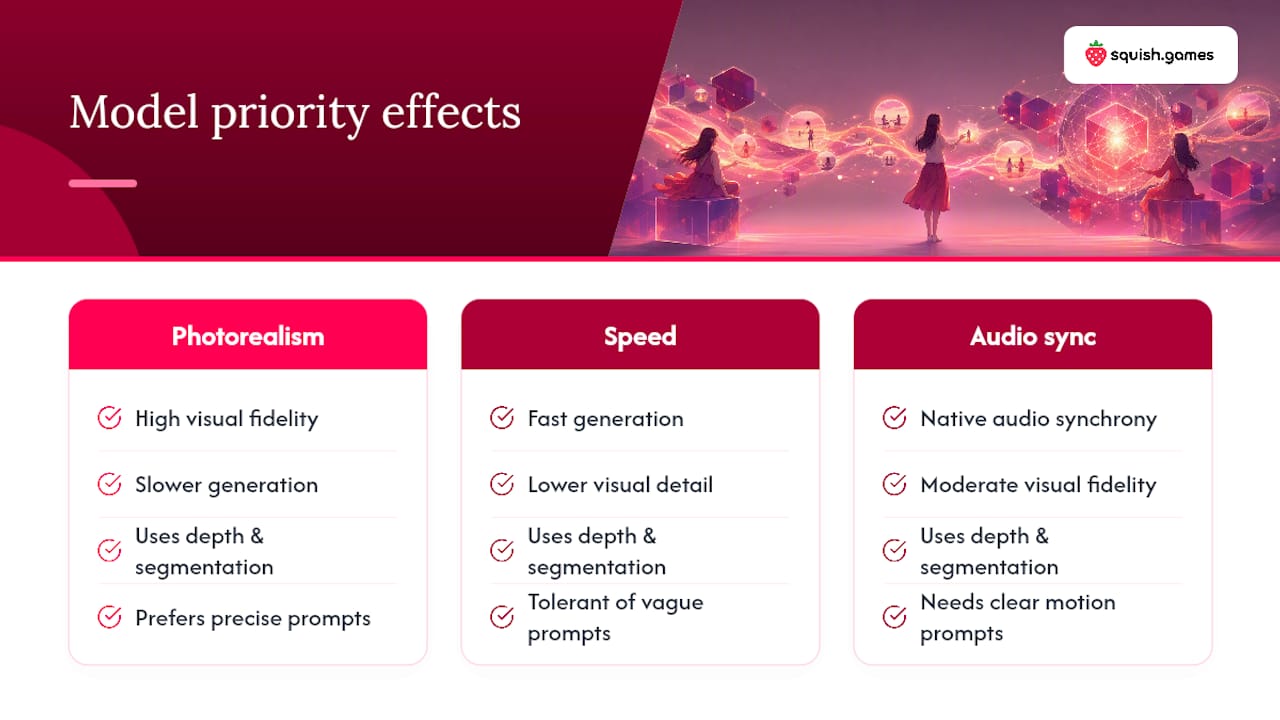
At a high level, these tools work by analysing a single still image, estimating depth, identifying the subject and background separately, and then generating a short sequence of frames that plausibly continues the scene. Model choice affects the result more than most people expect: some models prioritise photorealism, others speed, and others native audio synchrony, so matching your model to your priority genuinely changes what you get out the other end. Prompt specificity helps too. A vague upload with no guidance leaves the model guessing, while a short, clear motion description tends to produce more consistent, repeatable results across multiple attempts.
How to organise and select photos for the best AI result
Not every photo animates well, and knowing which ones do will save you a lot of frustrated re-generation. Prioritise images with a single clear subject, decent lighting, and visible separation between foreground and background. Group shots, heavily backlit photos, or images where the subject’s face is turned away from the camera tend to produce weaker results.
Batch your source photos by mood or occasion before you start rather than picking at random. An anniversary folder, a pet folder, a friend-group folder. This makes it far easier to build a short series of clips that feel like they belong together, rather than a scattered pile of one-offs with no connective thread.
Sharing AI-generated memories securely with family and friends
Once you’ve made a clip worth keeping, think about who actually sees it. Private messaging apps with disappearing media settings work well for intimate clips meant for one or two people. Shared albums with restricted access suit wider family sharing, while public social feeds make sense only for content everyone involved has agreed can go public.

Check platform-specific privacy controls before posting, not after. Whether a clip defaults to public or private, and whether followers can reshare it, varies a lot between apps, and that default setting is often where accidental oversharing happens.
Author perspective: why a consent-first approach matters
Working with photo animation tools day to day teaches you one thing fairly quickly: the technical side is easy now. Getting a photo to move convincingly takes minutes, not hours. The part people underestimate is the judgement call before you even open the app, whether the person in the photo would actually want to see themselves moving on someone’s phone screen.
Most guides on this topic treat consent as a legal footnote. I’d argue it’s the actual craft. Anyone can generate a clip. The creators whose work holds up, whose family and friends trust them with more photos over time, are the ones who ask first, keep a record of that permission, and treat the archive master file as seriously as the shareable version. Start small: one photo, one honest conversation about how it’ll be used, and a proper backup once it’s made. That habit scales far better than chasing the flashiest effect.
Try it: how Squish Games helps you preserve relationship memories
Squish gives you something most photo-to-video tools don’t bother with: a consent-forward policy built into how the platform actually works, not just written into terms nobody reads. You upload a photo, an avatar, a pet, or a fantasy character, choose an effect, and get a shareable clip without needing any editing skills at all.
The workflow is simple: upload, animate, save your archive master, then decide whether to share privately with the people in the clip or post it publicly. Squish is free to start, works entirely from your phone, and includes removal tools if you ever need to take something down. Jason’s beginner guide to AI photo animation walks through the whole process for anyone starting from zero, and if you’re planning to build up a proper collection over time, the guide to creating an AI video art portfolio is worth a look next. If you’d rather jump straight in, the no-editing-skills quick-start guide gets your first clip made today.
Summary checklist: what to do and what to avoid
The clearest way to preserve a relationship memory with AI is to combine a consent-first workflow with proper archival habits, starting with one photo on a platform like Squish Games.
- Get explicit consent before animating anyone else’s photo.
- Save your original source image and the prompt you used, not just the finished clip.
- Choose export settings suited to archiving, not just quick sharing.
- Apply the 3-2-1 backup rule to anything you want to keep long-term.
- Check a platform’s removal policy before you upload anything sensitive.
- Start with one short clip before attempting a full montage.
| Point | Details |
|---|---|
| Consent comes first | Get explicit permission before animating anyone else’s photo, and document it. |
| Keep the master file | Save the original photo and prompt alongside the exported clip for future edits. |
| Back up properly | Follow the 3-2-1 rule: three copies, two media types, one offsite or cloud copy. |
| Check removal options | Confirm any platform offers an accessible way to take content down if needed. |
| Start with Squish Games | A free-to-start, consent-forward platform built for turning photos into shareable clips. |
Sources
- Joint Statement on AI-Generated Imagery and the Protection of Privacy
- Oecd
- What Image to Video Means for Creators | Blog Picasso IA
- How Creators Can Turn Photos Into Engaging Videos with AI Tools | Our Code World
Leave a Reply