

Squish.games is the best free-to-start option for animating photos, avatars, fantasy characters, and adult-themed art into short, shareable social clips. No editing skills needed. The workflow is exactly what it sounds like: sign up, upload one image, pick a motion template, render, and share. Most users have their first clip ready quickly, typically within minutes.
Squish runs on a freemium credits model. Free users get daily-replenishing generations, letting you experiment without committing to a subscription. The free-to-start model covers the full workflow: mobile upload, motion templates, and social export. Paid credits unlock more daily runs, faster queues, and higher-resolution outputs. For casual creators, the free tier is genuinely usable. For anyone posting regularly, a small credit top-up goes a long way.

Table of Contents
- How do you animate a photo in five steps on mobile?
- What does ‘free’ actually get you on AI animation platforms?
- How do you choose a free AI animation platform?
- Safety, consent, and UK-specific cautions for adult and avatar content
- What are the best use cases and templates for social sharing?
- How do you fix common problems with AI animation outputs?
- Key takeaways
- Why consent-first animation is the only sensible design choice
- What Squish.games gives you from day one
- Useful sources and further reading
How do you animate a photo in five steps on mobile?
AI animation platforms that offer pre-made motion templates dramatically cut iteration time for beginners. Squish is built around exactly that: a fast, mobile-first loop from image to shareable clip.
What to have ready before you start:
- A clear photo or AI-generated image (minimum 720p, ideally square or portrait crop)
- Clean background or a subject with strong contrast against it
- Optional: a short reference video if you want to match a specific motion style
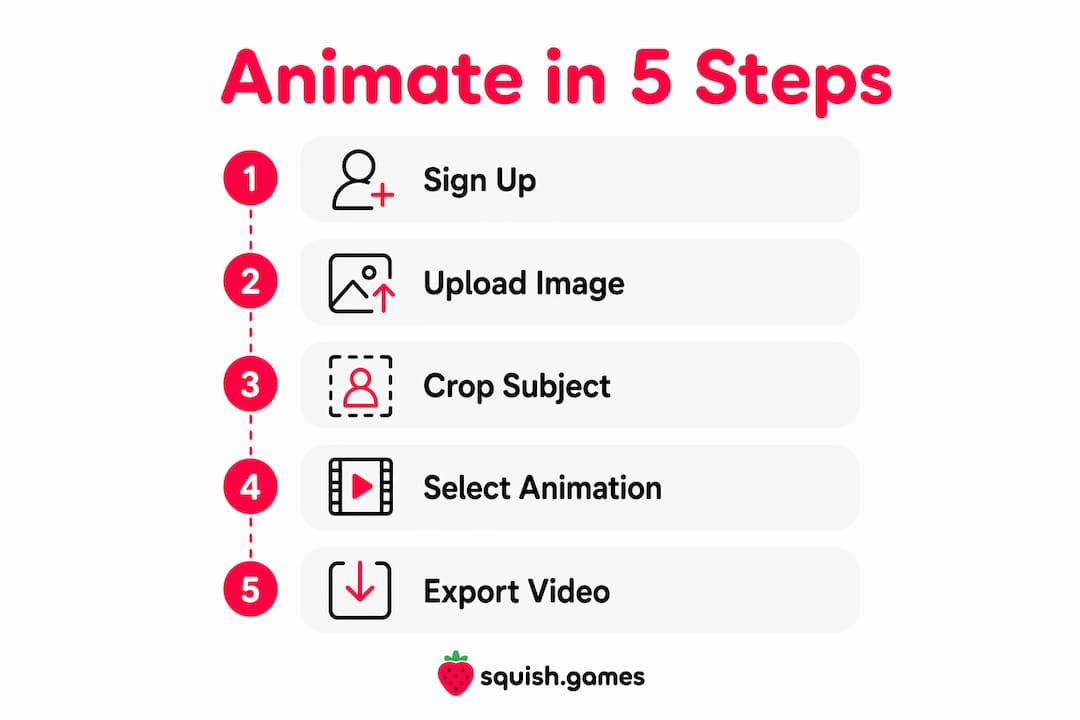
The five steps:
- Sign up. Use your email or Google account. Takes under a minute. Grant camera roll permissions when prompted so you can pull images directly from your phone.
- Upload your image. Tap the upload button, select from your camera roll, and crop to your subject. Portrait orientation works best. Avoid images where the subject is small or off-centre.
- Pick a motion template or enter a prompt. Browse the template library (dance, bounce, jiggle, fantasy motion, NSFW styles) or type a short text prompt describing the movement you want. Templates are faster for first attempts.
- Preview and tweak. The in-app preview shows a low-resolution draft. Adjust the motion intensity or swap templates before committing a full render. This is where you save credits.
- Export in 9:16 and share. Native 9:16 export preserves AI-generated detail far better than cropping a wider render after the fact. Download the clip and post directly to Reels, TikTok, or Stories.
Estimated time: 5–10 minutes for a first clip, including sign-up. Repeat runs take 2–3 minutes once you know the workflow.
Pro Tip: Crop your image tightly to the subject before uploading. The model reads the subject’s edges to map motion. A loose crop with lots of background gives it too much to interpret and often produces warped results.
What does ‘free’ actually get you on AI animation platforms?
Free tiers vary more than most guides admit. Pricing patterns range from perpetual low-limit free plans to one-time credit grants and short trials. Knowing the difference saves frustration.
| Free tier type | What you get | Common trade-offs |
|---|---|---|
| Daily-replenishing credits | A set number of generations per day (e.g. up to five), resets daily | Slower render queues, standard resolution |
| One-time credit grant | A fixed credit bundle on sign-up, no ongoing free usage after | Watermarks on outputs, no top-up without paying |
| Perpetual low-limit plan | Ongoing free access at very low volume | Persistent watermarks, lowest export resolution |
| Free trial | Full access for a short period, then paywall | No ongoing free tier once trial ends |
Squish uses a daily-replenishing model with optional credit purchases. That means you can return each day and generate without paying, which suits casual creators well. The signals that suggest upgrading: you are hitting your daily limit before finishing a project, you need watermark-free exports for professional posts, or you want faster render times during peak hours.
Scenario A — casual daily use: Five free generations per day is enough to experiment with new templates, test a character concept, or produce one polished clip. No payment needed.
Scenario B — small-scale creator output: Posting three to five times per week with varied content will likely exhaust the free tier within a day or two. A modest credit purchase covers the gap without locking you into a monthly subscription.
Pro Tip: Use your free generations for drafts and previews. Only commit a full render (which costs more credits) once the preview looks right. Draft mode is your budget’s best friend.
How do you choose a free AI animation platform?
Specialist, AI-native platforms built for short-form entertainment consistently outperform professional 3D pipelines for speed and social shareability. The checklist below cuts through the noise.
What to look for:
- Mobile-first UX. If the platform requires a desktop browser to function properly, it will slow your workflow. Test the upload and export flow on your phone before committing.
- Native 9:16 export. Non-negotiable for Reels and TikTok. Cropping after the fact degrades quality.
- Freemium model clarity. The credit cost per generation should be visible before you render, not after. Opaque pricing is a red flag.
- NSFW and avatar support with consent controls. If you create adult-themed or intimate content, the platform must have explicit age-verification, content flags, and private sharing options built in.
- Template library and community. A healthy template library means faster results. An active community means better troubleshooting resources.
- UK-compatible browser and device support. Most modern platforms run on Chrome and Safari on iOS and Android. Verify before signing up.
Red flags:
- No visible consent or age-check policy in the platform docs
- Watermarks on every free output with no path to remove them
- Credit pricing revealed only at checkout
- No 9:16 export option at all
Pro Tip: Before signing up, search “[platform name] NSFW policy” and “[platform name] consent”. If the platform has no public documentation on either, treat that as a hard no for adult-themed work.
Safety, consent, and UK-specific cautions for adult and avatar content
Consent-first platform policies and explicit adult-content controls are key differentiators for creators working with intimate or NSFW imagery. They reduce both legal risk and community harm.
| Action | Why it matters |
|---|---|
| Obtain written consent for identifiable people | UK law criminalises non-consensual intimate imagery under the Online Safety Act 2023 |
| Avoid third-party images without a licence | Copyright infringement applies to AI-animated outputs as much as static images |
| Record proof of consent | Protects you if a complaint is made after publication |
| Use private sharing or unlisted links for sensitive content | Reduces exposure risk before you are certain about distribution |
Squish’s consent-first policy means adult content is available only through explicit opt-in, with age restrictions and content flags built into the platform. That structure protects creators as well as subjects.
Pro Tip: If you are animating a real person’s image, save a copy of their consent (a message, a signed form, anything timestamped) before you publish. UK law puts the burden of proof on the creator.
This section is general information, not legal advice. For your specific situation, consult a qualified solicitor or check the Crown Prosecution Service guidance directly.
What are the best use cases and templates for social sharing?
Short-form AI platforms optimised for entertainment deliver the best balance of speed and visual impact for social creators. The formats below match what performs on UK social feeds.
Format guide:
- 9:16 (Reels, TikTok, Stories): Your default. Use dance, bounce, and reaction motion templates.
- 1:1 (feed posts): Works well for fantasy character reveals and loopable sticker-style art.
- Short MP4 or GIF (messaging, Discord): Jiggly effects and pet antics. Keep under five seconds for easy sharing.
Micro-template starters:
- Fantasy character intro: Upload a portrait-style AI character image, pick a slow-reveal motion, add a caption like “Meet [character name]” and relevant fandom hashtags.
- Dance clip: Upload a selfie or avatar, pick an upbeat dance template, export 9:16, post to Reels with trending audio.
- NSFW art reveal: Use a consent-verified image, pick a slow-pan or bounce effect, set to private or age-gated before sharing. Check platform content flags before posting publicly.
- Pet antics: Upload a clear pet photo (good contrast, no busy background), pick a jiggle or bounce template. These perform well organically on UK social feeds.
For deeper guidance on social sharing AI art, Squish’s creator guide covers format strategy and hashtag approaches in detail.
How do you fix common problems with AI animation outputs?
A high-contrast, clean reference image reliably improves motion mapping. Most quality problems trace back to the source image, not the model.
Image prep checklist:
- Subject fills at least 60% of the frame
- Background is plain or low-detail
- No motion blur in the original photo
- Lighting is even, with clear shadow definition on the face or body
Common problems and fixes:
- Warped limbs: Usually caused by a cluttered background or a subject that is too small in the frame. Re-crop tightly and re-render.
- Inconsistent identity across frames: The model is losing track of the face. Use a front-facing, well-lit portrait rather than a three-quarter or side angle.
- Garbled background: Busy backgrounds confuse the model. Either remove the background before uploading (many phone apps do this in one tap) or use a plain-colour backdrop.
- Motion feels wrong for the style: You picked the wrong template. Swap to a slower or simpler motion and preview before committing a full render.
Pro Tip: Write your text prompt in plain, specific language: “slow bounce, facing camera, warm lighting” outperforms “cool dynamic movement”. Vague prompts produce vague motion.
For detailed image animation best practices, the Squish guide for digital artists covers export and prep in depth.
Key takeaways
Squish.games is the strongest free-to-start option for mobile-first photo and avatar animation, covering playful, NSFW, and fantasy content with consent controls built in.
| Point | Details |
|---|---|
| Start free, upgrade when needed | Daily-replenishing credits let you animate without paying; upgrade only when volume or quality demands it. |
| Image quality drives output quality | A high-contrast, tightly cropped source image is the single biggest factor in avoiding warped or garbled results. |
| 9:16 is non-negotiable for social | Always export natively in 9:16 for Reels and TikTok; cropping after the fact degrades AI-generated detail. |
| Consent is a legal requirement in the UK | The Online Safety Act 2023 criminalises non-consensual intimate imagery, including AI-animated content. |
| Squish covers the full workflow | From selfies and pets to NSFW art and fantasy characters, Squish handles the complete free-to-start animation loop. |
Why consent-first animation is the only sensible design choice
The conversation around AI animation tends to focus on what the models can do. What gets less attention is what platforms choose to allow, and how they structure that choice.
Most platforms treat adult content as an afterthought: a toggle buried in settings, a vague community guidelines page, and no real age-verification. That approach fails creators and subjects alike. It pushes adult-themed work into grey areas where the rules are unclear, enforcement is inconsistent, and the creator carries all the risk.
Squish’s consent-first design is a deliberate product decision, not a marketing line. Explicit opt-in for adult content, built-in content flags, and private sharing options exist because the alternative is a platform that cannot be trusted by the people who use it most seriously. For social creators working with intimate or NSFW imagery, that trust is the product.
The mobile-first UX follows the same logic. If the workflow requires a desktop and a learning curve, it excludes the majority of creators who are making content on their phones, in the moment, for audiences who consume it the same way. Speed and simplicity are not compromises. They are the point.
What Squish.games gives you from day one
Squish is built for creators who want results without a production pipeline. Upload a photo, avatar, AI character, or NSFW image, pick a motion template, and have a shareable clip in minutes. The free-to-start workflow covers the full loop: mobile upload, template selection, in-app preview, and 9:16 export.
Free users get daily-replenishing generations covering dance clips, bounce effects, jiggly interactive art, and adult-themed animations with consent controls. Paid credits unlock more daily runs, faster render queues, and higher-resolution exports. No subscription required to start. Head to Squish.games and upload your first image today.
Useful sources and further reading
- Squish.games platform docs and quick-start guides: Check the platform’s help pages for current credit limits, export formats, consent policies, and NSFW opt-in steps before publishing adult-themed content.
- Platform policy search: Platform documentation and help pages are the most reliable places to verify consent and NSFW policies before use.
- AI animation software overview: Worldmetrics covers the broader AI animation software market, useful for understanding where template-based platforms sit relative to professional tools.
- AI animation tools comparison: Grokipedia’s comparison covers free tier structures across platforms, including watermark policies and credit models.
- Crown Prosecution Service (CPS) guidance on intimate image abuse: The CPS publishes current guidance on the Online Safety Act 2023 and non-consensual intimate imagery. Consult this before publishing any content featuring identifiable real people.
- Best free animation tools review: AI Daily Shot’s 2026 roundup covers export format best practice and social-ready output comparisons.
Leave a Reply