

AI video art portfolio creation is the process of strategically assembling a curated selection of dynamic AI-generated video projects using modular workflows and AI-powered tools to build a client-attractive digital showcase. The industry term for this practice is AI video portfolio production, and understanding the distinction between a gallery dump and a genuine case study portfolio is the single most important skill you can develop. This guide covers the tools, workflows, and presentation strategies that turn raw AI video work into a professional body of work that wins commissions.
What makes a strong AI video art portfolio?
Hiring managers spend roughly 90 seconds deciding whether to interview a candidate, and they prefer portfolios curated to around five projects that emphasise outcomes over process. That figure tells you everything about how to structure your digital art portfolio. Less is more, and every project you include must earn its place.
The difference between a gallery and a case study is decisive. A gallery shows finished video art examples. A case study shows the problem, the creative decisions made, the AI tools used, and the measurable result. Clients hire for decision-making and problem-solving evidence, not just visual quality. Agart Studio confirms that documenting the why behind your choices, including prompts, constraints, and iteration process, is a genuine competitive advantage.
Outcome-driven storytelling means attaching production metrics to every project. How long did it take? What did it cost? What was the client’s brief and how did you meet it? These numbers convert viewers into commissioners. A portfolio that reads like a production report is far more persuasive than one that reads like an art exhibition.
- Curate ruthlessly. Five strong projects outperform twenty average ones.
- Lead with outcomes. State the result in the first sentence of each case study.
- Document decisions. Record prompt iterations, art-direction trade-offs, and reflections.
- Show ownership. Highlight work where you drove the creative direction from brief to delivery.
Pro Tip: Write a one-sentence outcome statement for each project before you build its case study page. If you cannot summarise the result in one sentence, the project is not ready to show.
Which AI tools best support video portfolio creation?
Meta AI functions as an on-demand portfolio assistant, covering brainstorming, copy generation, layout iteration, and SEO editing from a single interface. That breadth makes it a practical starting point for creators who want to move from raw video files to a published portfolio page without hiring a copywriter or web designer.

Beyond Meta AI, the modern AI video portfolio relies on a modular pipeline of specialist tools. AI video pipelines use modular workflows with human review checkpoints at each stage, covering strategy, scripting, asset creation, editing, localisation, and publishing. Each stage has a defined input and output, which means you can swap individual tools without rebuilding the whole system.
Portfolio website builders with AI-assisted auto-layout and template generation, such as MOCKLIO, reduce the time between finishing a project and publishing it. MOCKLIO enables rapid upload and auto-generation of portfolio pages with generated visuals and short cinematic clips published via shareable links. That speed matters when you are pitching to a client who wants to see your work within the hour.
| Tool | Primary Function | Best Use Case |
|---|---|---|
| Meta AI | Copy, visuals, SEO editing | Portfolio copy and layout iteration |
| Runway Gen-3 Alpha | AI video generation | Hero videos and lookbook clips |
| MOCKLIO | Auto-portfolio page builder | Fast publishing with shareable links |
| Squish | Interactive AI video and animation | Social-ready clips and animated art |
| Gisteo AI Video Studio | Brand-consistent video production | Maintaining visual coherence across projects |
The table above is not exhaustive. The right stack depends on your output format, your clients’ expectations, and how much human editing you want to apply at each stage.
How to structure your portfolio content and workflow
A repeatable modular pipeline is the backbone of a professional AI video art portfolio. Marketing teams structure AI video production as a sequence: strategy, scripting, generation, editing, localisation, publishing, and feedback. Applying that same logic to your portfolio means every new project follows the same documented path, which makes your process legible to clients and keeps your output consistent.
Rotating content batches keep your portfolio dynamic without requiring a full rebuild every month. Treat your portfolio as a content system rather than a static archive. Building AI video portfolios as content systems with repeatable series and formats enables consistent updates and platform-specific cropping as AI tools evolve. Schedule a quarterly review where you retire weaker projects and add one or two new case studies.
Decision logs are the most underused element in AI-driven video art portfolios. A decision log records your prompt choices, the constraints you worked within, the iterations you rejected, and the reasoning behind your final direction. Decision logs documenting prompt iteration and art-direction trade-offs elevate portfolios beyond pure galleries into influential storytelling tools. Clients reading a decision log understand exactly how you think, which is what they are actually paying for.
Brand consistency is the difference between a portfolio that looks professional and one that looks assembled from random projects. A brand master with logos, fonts, and colour tokens improves perceived professionalism and avoids the fragmentary impression that ad-hoc AI generation often produces. Build your brand master before you start generating assets, not after.
Pro Tip: Create a shared folder containing your brand master files, logo variants, approved colour codes, and preferred font files. Reference this folder at the start of every new project to keep your visual identity coherent across all AI-generated outputs.
- Define pipeline stages before starting any new project.
- Use batch generation sessions to produce multiple assets in one sitting.
- Archive rejected iterations in a separate folder for future decision log reference.
- Review your portfolio quarterly and retire projects that no longer represent your current standard.
Step-by-step: how to make and publish your video portfolio
Building a client-ready AI video portfolio follows a clear sequence. Skipping steps is the most common reason portfolios feel unfinished.
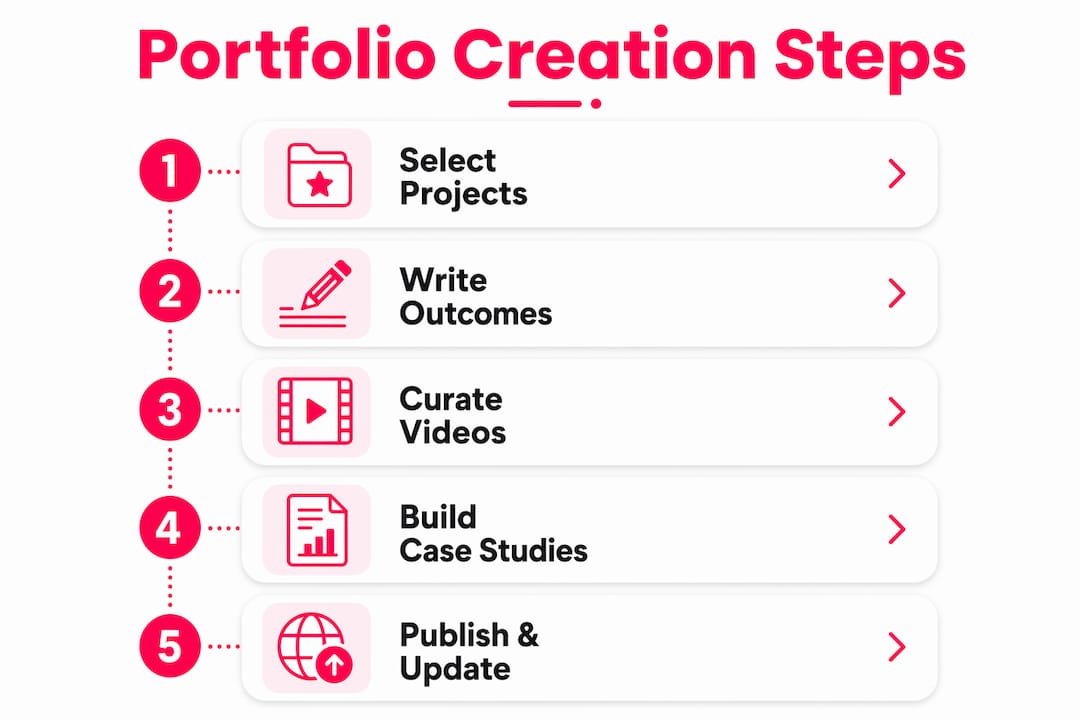
- Select your five strongest projects. Choose work that demonstrates range, problem-solving, and measurable outcomes. Prioritise projects where you made the key creative decisions.
- Write a storytelling outline for each project. Cover the brief, your approach, the AI tools used, and the result. Include production metrics such as time and cost.
- Use Meta AI or a similar AI portfolio creator to draft copy and generate layout options. Iterate until the tone matches your brand voice.
- Generate or refine your video art examples. Use tools like Runway Gen-3 Alpha or Squish to produce polished clips that represent each case study.
- Assemble your portfolio page using an auto-layout tool. MOCKLIO or a comparable builder can publish a shareable link within minutes of upload.
- Run SEO checks. Optimise page titles, image alt text, and project descriptions for the search terms your target clients use.
- Promote via digital channels. Share case study excerpts on LinkedIn, post short clips on Instagram Reels or TikTok, and send a direct link to prospective clients.
The production metrics you include in step two are particularly persuasive. A Runway Gen-3 Alpha case study produced a 90-second hero lookbook video plus variations in 48 hours for $487, compared with three weeks and $35,000 via traditional production. Showing comparable figures in your own case studies tells clients exactly what they are buying.
| Portfolio Stage | Key Output | Tool Suggestion |
|---|---|---|
| Project selection | Curated shortlist of five projects | Spreadsheet or Notion |
| Copywriting | Outcome-led case study text | Meta AI |
| Video generation | Polished clips and variations | Runway, Squish |
| Page publishing | Shareable portfolio link | MOCKLIO |
| SEO and promotion | Optimised titles and social clips | Meta AI, native platform tools |
What are the most common AI portfolio mistakes?
Portfolios fail less often on visual quality and more often by failing to deliver quick, clear decision signals within the reviewer’s time constraints. Knowing the most common errors saves you from building a portfolio that looks impressive but converts nobody.
- Overloading with projects. More than five projects dilutes focus and forces reviewers to do the work of curation for you.
- Presenting galleries instead of case studies. A grid of finished videos tells a client what you made. A case study tells them how you think.
- Removing human oversight from the pipeline. Fully automated AI video production without review checkpoints produces inconsistent results and erodes client trust.
- Inconsistent branding. Mixing fonts, colour palettes, and visual styles across projects signals a lack of professional discipline.
- Ignoring SEO. A portfolio that cannot be found is a portfolio that cannot convert. Optimise every page title and description for the terms your clients search.
Pro Tip: Ask a peer who has never seen your portfolio to spend 90 seconds reviewing it and then tell you what you do and who you do it for. If they cannot answer both questions clearly, your curation and copy need work.
Key takeaways
A strong AI video art portfolio wins clients through strategic curation, outcome-led case studies, and a repeatable modular production workflow rather than through sheer volume of work.
| Point | Details |
|---|---|
| Curate to five projects | Hiring reviewers spend roughly 90 seconds assessing portfolios, so fewer, stronger projects convert better. |
| Use case studies, not galleries | Document prompts, decisions, and outcomes to show clients how you think, not just what you made. |
| Build a modular pipeline | Define each production stage with clear inputs and outputs to keep your workflow consistent and scalable. |
| Include production metrics | Time and cost figures in case studies convert portfolio viewers into commissioning clients. |
| Maintain brand consistency | A brand master with fixed fonts, colours, and logos prevents the fragmentary look that undermines professionalism. |
Why i think most AI video portfolios are solving the wrong problem
Most emerging video artists spend the majority of their portfolio-building time on the videos themselves and almost none on the framing around them. I understand the instinct. The video is the work. But in practice, a client looking at your portfolio is not watching your clips the way an audience watches a film. They are scanning for evidence that you can solve their problem reliably and affordably.
The single biggest shift I have seen in effective AI video portfolios is the move from “look what I made” to “here is what I made, why I made it that way, and what it achieved.” That shift is not about writing more. It is about writing differently. One tight paragraph explaining your prompt strategy and the constraint you were working within tells a client more than three additional video examples.
I have also noticed that creators who treat their portfolio as a living content system, updating it quarterly and retiring weaker work, consistently outperform those who build it once and leave it static. AI tools evolve fast. A portfolio built entirely around one platform’s aesthetic can look dated within a year. Modular pipelines protect against that by making it straightforward to swap a generation tool without rebuilding your entire presentation.
The advice I give most often is this: write the outcome statement before you generate a single frame. If you know what success looks like, every creative decision in the pipeline becomes easier to justify, and your case study writes itself.
— Jason
Start building your AI video portfolio with Squish
If you are ready to move from static images to dynamic video art, Squish is built for exactly this moment. Squish is a free-to-start AI video and interactive art platform where you upload a photo, avatar, AI character, or original image and turn it into a short animated clip ready for your portfolio or social channels.

You do not need editing experience. Squish handles the animation, the motion effects, and the output formatting so you can focus on creative direction and curation. Whether you want a dancing character, a bouncing photo effect, or a jiggly interactive animation, the platform produces shareable AI videos in minutes. For creators building a portfolio that needs to stand out, Squish gives you a fast, mobile-first way to generate fresh video art examples without a complex production setup. Explore the full platform at squish.games and add your first animated piece today.
FAQ
How many projects should an AI video art portfolio contain?
Five projects is the recommended maximum. Hiring reviewers spend about 90 seconds assessing portfolios, so a tightly curated selection of outcome-led case studies converts far better than a large gallery.
What is the difference between a portfolio case study and a gallery?
A case study documents the brief, creative decisions, AI tools used, and measurable result. A gallery shows only finished outputs. Clients hire based on decision-making evidence, not visual volume.
Do i need coding skills to publish an AI video portfolio?
No. Tools like MOCKLIO and Meta AI handle auto-layout and page generation from uploaded assets. MOCKLIO publishes shareable portfolio links automatically after upload, requiring no technical skills.
How do production metrics help convert portfolio viewers into clients?
Concrete figures such as delivery time and cost show clients what they can expect from commissioning you. A Runway Gen-3 Alpha case study delivered a 90-second hero video in 48 hours for $487, the kind of evidence that turns a viewer into a buyer.
How often should i update my AI video art portfolio?
A quarterly review is the standard recommendation. Retiring weaker projects and adding one or two new case studies keeps your portfolio current as AI tools and client expectations evolve.
Leave a Reply