

Turn one still into a shareable clip by locking a keyframe, directing motion like a film shot, and running three fast variants to find your winner. That is the whole AI image to video content strategy in one sentence. Pick your best photo, crop it to 9:16, generate a refined still on Squish or any free image tool, then animate it with a short camera move and export a 3–10 second clip. Three variants, one winner, post.
Your immediate next steps:
- Choose one high-quality photo and crop it to 9:16 (1080 × 1920 px) for vertical social.
- Generate or refine the still on Squish before spending any animation credits.
- Write a one-line motion brief (e.g. “slow push in, warm backlight, soft focus”) and animate.
- Run three variants changing only one element each time, then pick the strongest.
Marketing strategist Jorge Arenas argues that creators should brief AI like a film director rather than typing long, unfocused prompts. That shift from lucky prompts to directed production is what separates forgettable clips from ones people actually save and share.
Table of Contents
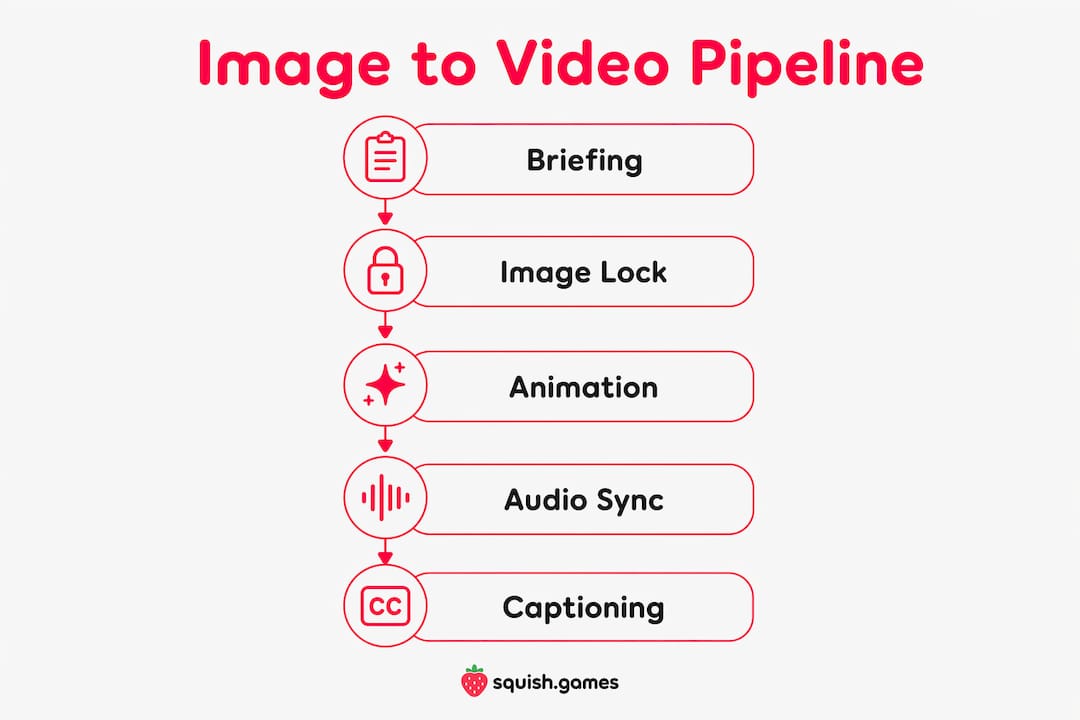
- Your five-step image to video pipeline
- How to brief AI like a film director
- How to keep your feed fresh with modular variants
- Which tools work best for mobile-first creators?
- Consent, copyright and safety for UK creators
- Posting for TikTok, Reels and Shorts: formats and optimisation
- How to test variants and scale your winners
- Key takeaways
- Why directing motion beats prompting it
- Start creating on Squish today
- Useful sources
Your five-step image to video pipeline
Image-first iteration is the primary lever for controlling cost and consistency: lock the composition cheaply as a still, then spend animation credits only on the frame you are happy with.
- Brief and shot list (1–2 minutes). Write your style prefix, motion instruction, and mood in three lines before you open any tool.
- Image lock and iterate (5–20 minutes). Generate the still, adjust lighting and composition, and save the seed value. Do not animate yet.
- Animate the keyframe (credits vary). Apply your motion brief to the locked frame. Aim for a short duration clip suitable for Reels and TikTok.
- Generate three variants (batch run). Change one axis per variant: motion speed, colour grade, or sound. Run them in parallel to save time.
- Assemble and export (5–15 minutes). Add captions, trim to platform length, and export at 1080p minimum.
Typical single-clip cost and time: 30–45 minutes end-to-end for a first clip; 10–15 minutes once you have a locked still and a tested brief. Free tiers on most platforms cover several clips per day.
Some models now generate synchronised audio alongside visuals, which removes a post-production step entirely. Worth checking before you reach for a separate sound tool.
Pro Tip: More than 85% of social video is watched without sound. Always burn in captions before you post, even on a five-second clip.

| Step | Time estimate | Cost indicator |
|---|---|---|
| Brief and shot list | 1–2 min | Free |
| Image lock and iterate | 5–20 min | Free to low |
| Animate keyframe | 2–5 min render | Credits vary |
| Three variants (batch) | 5–10 min | Low |
| Assemble and export | 5–15 min | Free |
How to brief AI like a film director
The single biggest improvement most creators make is switching from vague descriptions to camera language. A prompt like “make it move” gives the model nothing to work with. A brief like “slow push in, warm backlight, shallow depth of field, 5 seconds” gives it a shot.
Start every brief with a three-part structure:
- Style prefix: mood and look in 3–5 words (“cinematic, warm backlight, soft focus”).
- Shot instruction: camera axis and movement (“push in on subject, hold for 3 seconds”).
- Anchor frames: describe the start and end state so the model knows where to begin and stop.
Three example briefs for common playful shots:
- Portrait bounce: “Upbeat, bright key light, shallow focus. Subject bounces gently in place, camera static, 4 seconds.”
- Parallax pan: “Dreamy, cool tones, slight vignette. Camera drifts left while background layers move at different speeds, 6 seconds.”
- Dreamy zoom: “Warm golden hour, soft glow. Slow push in from chest to face, gentle lens blur at edges, 5 seconds.”
Do/don’t list:
- Do specify duration in seconds.
- Do name the camera move (push in, crane up, dolly left, tilt down).
- Don’t write a paragraph when a sentence will do.
- Don’t skip the style prefix; it anchors the model’s aesthetic decisions.
Pro Tip: Save the seed value or reference still after locking a character you like. Reusing it across variants keeps faces and costumes consistent without re-prompting from scratch. This matters especially for AI-generated characters and avatars.
How to keep your feed fresh with modular variants
Creative fatigue is what happens when your audience sees the same asset too many times and engagement quietly drops. Experts recommend modular systems that generate multiple variants from a single locked frame so you can rotate before performance falls.
A simple variant matrix works like this: take one locked still and change only one axis per run.
| Axis | Option A | Option B | Option C |
|---|---|---|---|
| Motion seed | Bounce | Drift | Push in |
| Colour grade | Warm golden | Cool blue | Desaturated |
| Caption copy | Playful/emoji | Minimal text | Question hook |
| Sound | Trending audio | Original music | No sound |
Four axes, three options each: that is 81 possible combinations from a single image. You do not need all of them. Pick the two or three that feel most distinct and test them.
Metric checklist to decide when to refresh:
- Watch-through rate drops below your personal baseline for two consecutive posts.
- Save and share rate falls more than 20% week on week.
- Comments shift from engagement to repetition (“seen this before”).
Creators who reuse base visuals and run batch processing produce far more variations while keeping per-asset time low.
Pro Tip: Change only one axis at a time when testing. If you swap the motion AND the sound simultaneously, you will never know which one moved the needle.
Which tools work best for mobile-first creators?
Drafting with faster, cheaper models and finalising with higher-quality engines is the practical approach most experienced creators use. You do not need one tool for everything.
Three tooling tiers:
- Mobile apps for quick effects: ideal for selfies, pets, and fun portrait animations. No editing skills required. Export directly to camera roll.
- Browser platforms for more control: better for character consistency, longer clips, and NSFW or nude art projects where consent and content settings matter.
- Model stacks for advanced users: separate agents for image generation, animation, audio, and assembly. Faster iteration at scale, but a steeper learning curve.
Feature checklist when choosing a tool:
- Free tier available with no credit card required.
- Mobile export at 1080p or better.
- Consent-first policy for identifiable images.
- NSFW and adult content support where needed.
- Simple enough to produce a clip in under five minutes.
Quick start on Squish:
- Open Squish on your phone.
- Upload your photo, AI image, avatar, pet, or fantasy character.
- Pick an effect: bounce, dance, dreamy zoom, or jiggly animation.
- Write a one-line motion brief and tap generate.
- Export and share directly to TikTok, Reels, or Shorts.
Squish is free to start, requires no editing skills, and supports consenting adult uploads including nude art and NSFW content. It is built for exactly this kind of playful, mobile-first clip.
Consent, copyright and safety for UK creators
UK law treats images of real, identifiable people seriously. The short version: if you did not take the photo, commission it, or receive explicit written permission from the subject, do not animate it for public posting.
Consent checklist:
- Obtain written permission before animating any identifiable person who is not you.
- Document the source of every image: self-taken, commissioned, licensed, or AI-generated.
- For NSFW or nude art, confirm the subject has given explicit consent and keep a record.
- Never use images that breach the platform’s terms of service.
Copyright and licence guidance:
- Check the licence before transforming any third-party image. Creative Commons licences vary; some prohibit commercial or derivative use.
- Prefer original images, AI-generated characters, or licensed creator content for public posts.
- Attribute when the licence requires it, even for short social clips.
Platform safety do/don’t for NSFW and nude art:
- Do use platforms that explicitly support adult content with age-gating (Squish supports this).
- Do mark content as sensitive or adult where the platform provides that option.
- Don’t post NSFW clips to platforms that prohibit them; know the rules for TikTok, Instagram, and YouTube before you upload.
Pro Tip: The UK’s Online Safety Act places responsibility on platforms, but creators are not exempt from liability for content they produce and share. When in doubt about a specific image’s legal status, consult a qualified legal professional rather than relying on general guidance.
Posting for TikTok, Reels and Shorts: formats and optimisation
| Platform | Aspect ratio | Ideal length | Max resolution | Captions |
|---|---|---|---|---|
| TikTok | 9:16 | 5–15 sec | 1080 × 1920 | Burnt-in or auto |
| Instagram Reels | 9:16 | 5–15 sec | 1080 × 1920 | Burnt-in or auto |
| YouTube Shorts | 9:16 | 3–10 sec | 1080 × 1920 | Auto or SRT |
| Instagram Feed | 4:5 or 1:1 | 3–10 sec | 1080 × 1920 | Burnt-in |
Given that over 85% of social video is watched without sound, burnt-in captions are not optional. They are the difference between a clip that communicates and one that scrolls past silently.
Sound and caption tips:
- Use trending audio on TikTok and Reels to boost algorithmic reach; original music works better for brand consistency.
- Keep captions to 3–5 words per frame for playful clips. Long text competes with the visual.
- Caption examples for playful AI clips: "wait for it ", "she came to life ", “your fave photo but make it move”.
Posting checklist:
- Hook in the first 2 seconds: movement, colour, or a caption that creates curiosity.
- Export at 1080p minimum; 4K is unnecessary for short clips and slows uploads.
- Use 3–5 niche hashtags rather than broad ones (#AIart, #PhotoAnimation, #SquishGames).
- Post consistently: 3–5 times per week outperforms sporadic high-effort drops for AI clip formats.
How to test variants and scale your winners
A simple A/B test does not need a spreadsheet. Two variants, one audience, 24–72 hours, one metric to watch.
Test template:
- Variant A: original motion brief, your default sound.
- Variant B: same still, one axis changed (e.g. motion speed or caption copy).
- Audience slice: post both at the same time of day, ideally within the same 24-hour window.
- Runtime: 24 hours minimum; 72 hours for a fuller picture on Shorts.
- Decision metric: watch-through rate is the most reliable signal for short clips.
Thresholds to promote a winner:
- Watch-through rate 10% higher than your baseline: scale it.
- Save or share rate up by 20%: repurpose across formats.
- Both metrics flat: retire the asset and start a new locked still.
Iteration checklist:
- Batch-generate the next round of variants before the current test ends.
- Repurpose winners by reformatting to 4:5 for Instagram feed and 16:9 for YouTube.
- Stop testing a clip after three rounds with no improvement; the still itself may need replacing.
Pro Tip: Splitting tasks across separate stages (image, animation, audio, assembly) lets you retry one step without regenerating everything. That alone cuts wasted credits significantly.
Key takeaways
A strong AI image to video content strategy comes down to four habits: lock a great still before animating, brief with camera language, run modular variants to beat creative fatigue, and test one axis at a time.
In the next 30 minutes: crop your best photo to 9:16, write a three-line motion brief, and animate one clip on Squish.
- Lock your still first; iterate composition cheaply before spending animation credits.
- Brief with camera language: style prefix, shot instruction, anchor frames.
- Run three variants changing one axis each time (motion, sound, colour).
- Burn in captions on every clip; more than 85% of social video is watched without sound.
- Test for 24–72 hours, scale watch-through winners, and retire flat assets after three rounds.
| Point | Details |
|---|---|
| Image-first iteration | Lock and refine your still before animating to save credits and keep motion consistent. |
| Director-style briefs | Specify camera move, duration, and style prefix; vague prompts produce unpredictable results. |
| Modular variant matrix | Change one axis per variant (motion, colour, sound, caption) to isolate what drives engagement. |
| Caption every clip | More than 85% of social video is watched without sound; burnt-in captions are non-negotiable. |
| Squish for quick starts | Squish is free to start, mobile-first, and supports NSFW and nude art with a consent-first policy. |
Why directing motion beats prompting it
Most creators spend their first few weeks typing longer and longer prompts, hoping the model will figure out what they mean. The shift that actually changes outcomes is much simpler: stop describing the feeling you want and start describing the camera move.
When you write “push in slowly from mid-shot to close-up over 5 seconds, warm backlight, shallow focus,” the model has a physical instruction to follow. When you write “make it feel magical and emotional,” it is guessing. The first approach produces consistent, repeatable results. The second produces surprises, some good, most expensive.
Modular variants make this even more powerful. Once you have a brief that works, you are not starting from scratch each time. You are turning one good decision into ten posts.
Start creating on Squish today
If you want to put this workflow into practice right now, Squish is the fastest route from photo to posted clip.
Upload any image — a selfie, an AI character, a pet, a fantasy portrait, or nude art with consent — pick a playful effect, write your one-line motion brief, and export a shareable clip in under five minutes. Squish is free to start, requires zero editing skills, and is built for exactly the kind of mobile-first, consent-first creativity this guide covers. NSFW and adult content are fully supported with appropriate age-gating.
Ready to animate your first photo and see it move? Head to Squish, upload your image, and have a clip ready to post before you finish your next cup of tea. For creators who want to go further, the AI video art portfolio guide shows how to turn individual clips into a cohesive creative body of work.
This article is general information for creative purposes, not legal or professional advice. For questions about UK copyright, consent law, or platform-specific rules, consult the relevant primary source or a qualified professional.
Useful sources
- The 2026 AI Video Generation Playbook for Marketers — Jorge Arenas on director-style briefs and creative fatigue.
- Image-First Iteration: Why generate a still before the video — the case for locking frames before animating.
- Boosting productivity with AI image and video automation workflows — batch processing, audio generation, and efficiency gains.
- How to use AI video generation for content marketing: a multi-agent workflow — modular pipelines and the 85% silent-viewing statistic.
- Sora: Creating video from text — OpenAI’s technical overview of image-to-video generation.
Leave a Reply